
SEO work is not finished when you publish a page, update a title, improve internal links, or fix a technical issue.
The next question is:
Did the work actually help?
That is where tracking SEO progress matters.
SEO progress is not one ranking, one traffic number, or one dashboard score. It is the change you observe over time in the search performance and outcomes that matter for the goal you are trying to achieve.
For one page, progress might mean appearing for more relevant searches. For another, it could mean earning more clicks from similar search exposure. For a business page, the more meaningful outcome may be qualified visits, leads, sales, sign-ups, or another action after the search visit.
The goal is not to make every metric increase at once. It is to establish a baseline, measure the signals that match your objective, compare trends over time, and interpret those signals together.
What Does SEO Progress Actually Mean?
SEO progress is the measurable change in relevant search performance and outcomes over time.
An important distinction is:
SEO activity is not the same as SEO progress.
Publishing five articles is activity.
Updating twenty title tags is activity.
Adding internal links is activity.
Those actions may be useful, but they do not prove that performance improved.
Progress is what you observe afterward.
Did relevant pages begin receiving more impressions from Google Search? Did clicks increase? Are useful queries appearing more often? Did an important page attract more qualified organic visitors? Did those visitors complete the action the page was intended to support?
You may not get the answer from one metric.
A practical way to think about measurement is:
Baseline -> action -> measurement -> comparison -> interpretation
That sequence helps you separate the SEO work you performed from the evidence you later use to judge whether performance moved in a useful direction.
Start With a Baseline
You cannot meaningfully measure change if you do not know where you started.
A baseline records the current state of the page, query set, campaign, or site area you plan to work on.
Suppose a page receives 2,000 Google Search impressions and 35 clicks during one period. You improve the content and internal linking, then review performance again later.
The new numbers only become useful when you compare them with the earlier state.
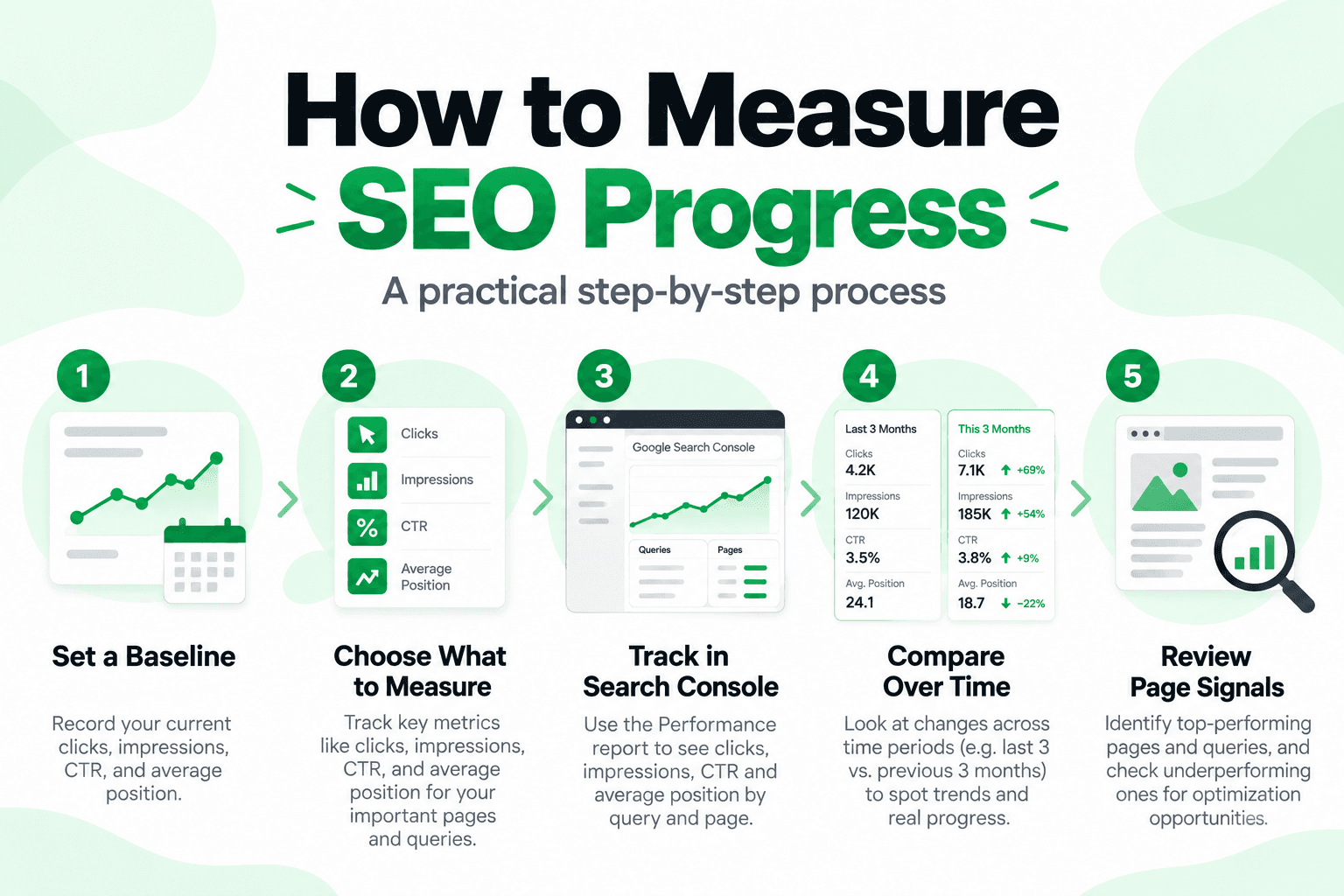
A practical baseline might include:
- Search clicks
- Search impressions
- CTR
- Average position
- Important queries
- Important landing pages
- Relevant on-site outcomes
Google Search Console's Performance report provides clicks, impressions, CTR, and average position, along with dimensions such as queries, pages, countries, devices, search appearance, and dates. CTR is calculated as clicks divided by impressions. See Google's Search Console Performance report documentation.
The baseline does not need to become a complicated reporting exercise. Record enough information to answer a simple question later:
What changed compared with where we started?
There is also an important measurement guardrail:
A performance change after an SEO update does not prove that the update alone caused it.
Search demand, seasonality, competitors, SERP changes, other site updates, and external events can also influence performance.
That is why SEO measurement should help you investigate evidence - not manufacture certainty.
What Should You Measure for SEO Progress?
There is no single SEO KPI that explains everything.
The right metrics depend on the objective.
A simple framework is:
Goal -> relevant KPI -> trend -> interpretation
If the goal is to improve search visibility for an informational page, impressions and relevant queries may matter heavily.
If the page already receives strong exposure but relatively few clicks, CTR and how the result is presented may deserve more attention.
If search traffic is arriving but the page is not producing its intended business outcome, on-site behavior and conversion data may matter more than another small movement in average position.
The point is not to track every number available.
Track the numbers that help you understand the goal.
Search Clicks
Search Console clicks show how often users clicked from Google Search results to your site. See Google's Search Console metric definitions.
An upward click trend can be useful, especially when it comes from relevant queries and important pages.
But clicks still need context.
A branded search spike, seasonality, one unusually strong page, or changing demand can move totals.
When the site-wide number changes, look at the pages and queries behind it.
Impressions
Impressions show how often a link to your site appeared in Google Search under Search Console's counting rules. See Google's impressions, clicks, and position documentation.
Growing impressions can indicate that your site is appearing for more searches or appearing more often.
But more impressions do not automatically mean better SEO results.
Impressions up + clicks flat = investigate.
It may mean:
- the page is appearing for more relevant searches but is still low in the results;
- new queries are broader or less aligned with the page's main intent;
- the result is being shown more often without attracting more clicks;
- visibility is expanding before click growth follows.
The correct response is not to label it a failure.
Look at the queries, pages, CTR, and other context.
CTR
CTR is clicks divided by impressions. See Google's Search Console Performance report documentation.
It can help you understand how often people click after seeing the result.
There is no universal "good CTR" that applies equally to every page and query.
CTR can vary with:
- search intent;
- result position;
- SERP layout;
- query type;
- device;
- competing results;
- brand familiarity;
- search features.
That makes CTR most useful when you compare it in context rather than against an arbitrary benchmark.
Average Position
Average position needs more careful interpretation than many SEO dashboards suggest.
Search Console reports the average position of the topmost result from your site or the grouping shown in the report. See Google's Search Console position documentation.
That is not the same as saying:
"My page ranks at exactly position 7 everywhere."
Search results can vary, and Search Console is reporting an average across impressions.
Average position can still provide useful context when you monitor trends for a relevant page or query, but it should not become the entire definition of SEO progress.
Google's own Search Console guidance recommends focusing more on trends in impressions and clicks than on position alone. See Google's Performance report guidance.
How to Track SEO Progress in Google Search Console
For many websites, Google Search Console is one of the most useful starting points for understanding Google Search performance.
The Performance report can help you see:
- how search traffic changes over time;
- which queries show your site;
- which pages receive clicks and impressions;
- how CTR changes;
- how average position changes.
For report setup and metric details, see Google's Search Console Performance report documentation.
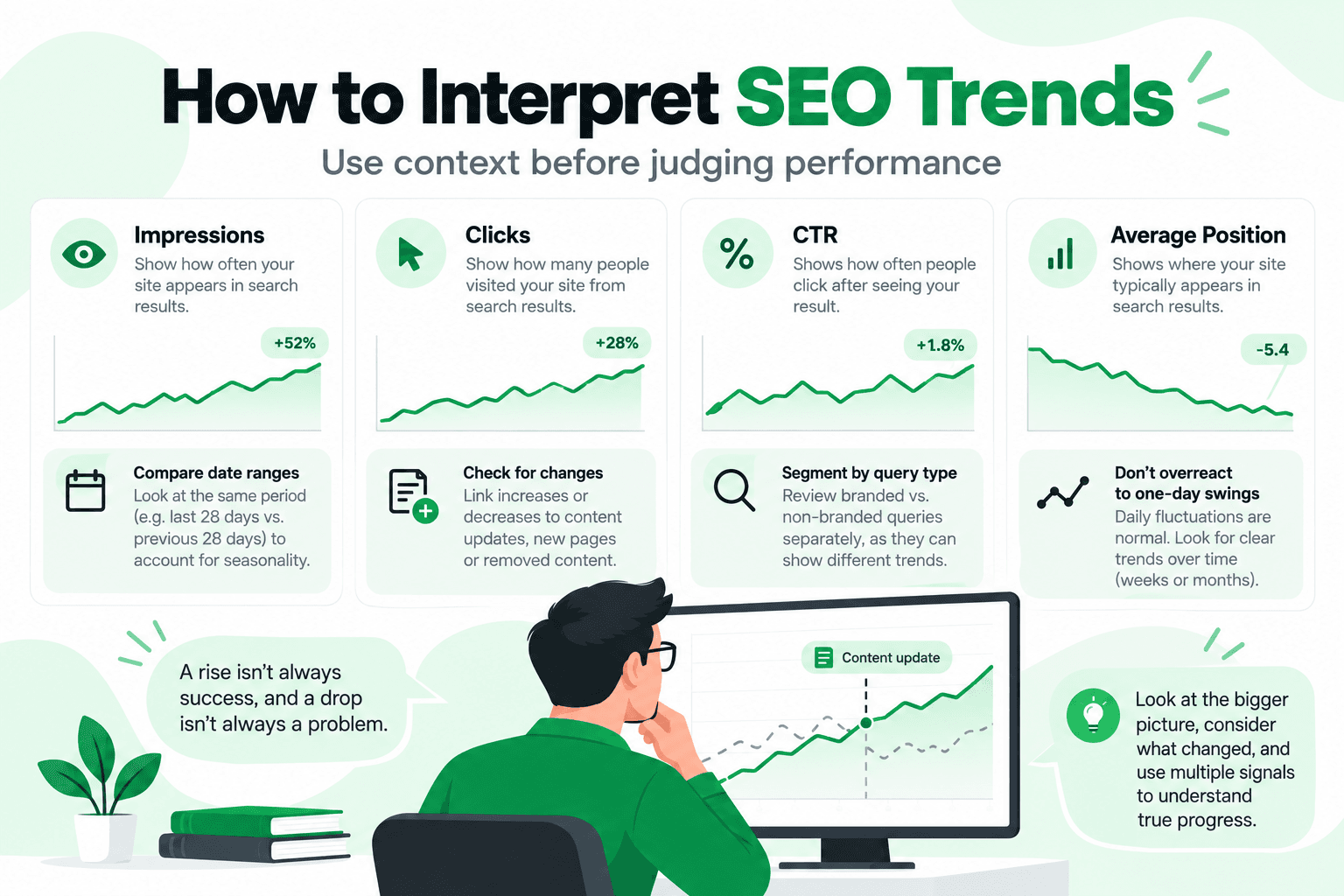
You do not need to react to every daily movement.
Search Console supports weekly and monthly views to help smooth daily fluctuations and make longer-term trends easier to see. See Google's Performance report documentation.
A more useful review might compare:
Previous period -> current period
Then ask:
- Which pages gained or lost impressions?
- Which queries changed?
- Did clicks move in the same direction?
- Is the movement concentrated in one page?
- Did the pages you actually worked on improve?
- Was there another change that could have affected the result?
Where possible, compare reasonably similar periods and be aware of factors such as seasonality, promotions, demand changes, or major site updates.
The purpose of comparison is not to prove that one SEO change caused everything that followed.
It is to build enough context to understand what is happening.
Search Console and Analytics Measure Different Parts of Performance
Search Console and Google Analytics should not be treated as interchangeable.
Search Console focuses on how your site performs in Google Search: queries, pages, clicks, impressions, CTR, average position, and related Search dimensions. See Google's Search Console Performance report documentation.
Google Analytics provides a different measurement context. Its acquisition reports help explain how users arrived, while other reports can help show what users did after reaching the site, including engagement, events, and configured outcomes. See Google's Analytics acquisition documentation.
A simple distinction is:
Search Console -> What happened in Google Search?
Analytics -> How did visitors arrive, and what did they do on the site?
The two sources complement each other.
A page may gain clicks from Search but still fail to achieve the business outcome it was designed for.
Another page may attract less traffic but produce highly valuable leads or sales.
SEO progress should be measured against the purpose of the page, not traffic alone.
Track Pages, Not Just the Whole Site
Site-wide numbers can hide what is happening on individual pages.
A website can gain total clicks while an important page declines.
The opposite can also happen.
If you updated five specific pages, measure those pages rather than relying only on the total property graph.
Ask:
- Did their impressions change?
- Did clicks change?
- Are the queries still relevant?
- Is the change concentrated in one page?
- Did the page achieve its intended outcome?
This is especially useful after changes such as:
- rewriting page content;
- updating title text;
- changing headings;
- improving internal links;
- consolidating overlapping pages;
- improving images;
- fixing canonical or indexing issues.
Search Console generally assigns most page-level performance data to the canonical URL rather than duplicate URL variations, which is useful to remember when comparing page data. See Google's canonical URL aggregation documentation.
Tracking the affected pages helps connect the measurement to the work that was actually done.
How to Interpret SEO Trends Without Overreacting
Metrics become more useful when you look at them together.
Suppose impressions increase sharply while clicks remain almost unchanged.
Do not immediately conclude that SEO failed.
Look at:
- which queries created the extra impressions;
- whether those queries are relevant;
- whether the page is appearing in different positions;
- whether CTR changed;
- whether the page now appears for a broader search set.
Now imagine clicks increase while impressions remain relatively stable.
That may be worth investigating as a potentially positive pattern, but you still need to understand which queries and pages contributed to it.
If relevant impressions and clicks both rise across useful pages and queries over time, that generally gives you stronger evidence of useful growth than one isolated ranking movement.
The main rule is:
Treat metrics as evidence to interpret together, not as independent verdicts.
Branded and Non-Branded Search Can Change the Story
Site-wide growth does not always tell you where that growth came from.
If more people begin searching specifically for your brand, branded queries may produce more clicks.
That is real organic search traffic.
But it represents a different type of growth from people discovering you through non-branded topics, services, products, or questions.
Where available, Search Console provides a Branded / Non-branded query filter in the Performance report. Google notes that the filter may not be available for sites with low impression volume or sub-properties, and that the classifications are informational and can occasionally be inaccurate. See Google's branded and non-branded query guidance.
So do not treat branded/non-branded classification as a perfect or universally available metric.
Use it as another piece of context.
A Simple SEO Campaign Tracking Process
SEO campaign tracking does not need to become a full project-management system.
For a focused SEO initiative, use a simple sequence:
Define -> Baseline -> Record -> Measure -> Compare -> Interpret
Define what you are trying to improve.
Record the pages involved and the changes made.
Capture the starting performance.
Choose the metrics connected with the goal.
Compare results over time.
Then interpret what the data suggests.
For example, if you update an underperforming informational page, you may track:
- relevant query impressions;
- search clicks;
- page-level performance;
- post-click outcomes.
You do not need every SEO KPI available.
You need the metrics that help answer whether the initiative is moving toward its intended outcome.
Common SEO Measurement Mistakes
Reacting to One Day of Movement
Search performance fluctuates.
One day of higher clicks or a lower average position does not prove that SEO improved or declined.
Look for patterns.
Treating Average Position as an Exact Rank
Search Console average position is an aggregated metric.
It is not a universal fixed rank seen by every searcher. See Google's Search Console position documentation.
Treating More Impressions as Automatic Success
More search exposure can be useful, but relevance matters.
Look at the queries and pages behind the increase.
Looking Only at Site-Wide Totals
A total graph can hide important page-level changes.
If your SEO work focused on specific pages, check those pages.
Ignoring Branded vs Non-Branded Context
Growth driven by branded demand tells a different story from growth driven by broader discovery.
Both can matter, but they should not automatically be interpreted the same way.
Changing Too Many Things at Once
If you rewrite content, change title tags, alter internal links, migrate URLs, and make other major changes at the same time, it becomes harder to understand what influenced the later performance shift.
That does not mean you must change only one thing at a time.
It means you should document major changes and avoid making causal claims the data cannot support.
Measuring Without a Goal
This is one of the most common problems.
If you do not know what you are trying to improve, almost any number can be made to look important.
A goal gives the metrics meaning.
How Long Should You Measure Before Judging SEO Progress?
There is no universal timeline that applies to every page, website, or SEO change.
The time required to see a meaningful trend can vary with the type of change, search demand, crawling, competition, existing visibility, and other factors.
Instead of relying on an arbitrary "30 days," "3 months," or "6 months" rule, establish a baseline and compare performance over a period long enough to separate a trend from ordinary short-term movement.
Use consistent comparisons and let the evidence determine when you have enough information to make a useful judgment.
Measuring Progress Is Not the Same as Running an SEO Audit
Measurement and diagnosis are related, but they are not the same task.
Tracking SEO progress helps answer:
What changed?
An SEO audit is more focused on:
What issues or opportunities should be investigated?
For example, Search Console may show that an important page lost impressions.
That tells you something changed.
It does not automatically tell you why.
A separate audit or page review may then examine content, headings, links, indexability, canonical signals, technical issues, or other relevant factors.
If you need the diagnostic side of that process, RankCrow's SEO Audit Guide covers that intent separately.
Keeping these two tasks distinct prevents the article from turning performance data into unsupported conclusions.
Where RankCrow Fits Into SEO Progress
Performance data and page analysis answer different questions.
Performance data tells you what is happening.
A page-level analyzer can help you inspect relevant on-page signals.
RankCrow belongs in the second category.
If Search Console shows that an important page deserves investigation, RankCrow can help review supported page-level signals such as:
- title and meta description;
- headings and heading hierarchy;
- content;
- keyword presence and density;
- internal and external links;
- images and ALT text;
- canonical and indexability signals;
- HTTPS;
- viewport configuration;
- structured-data detection;
- RankCrow SEO Score.
RankCrow does not:
- track rankings;
- provide Google Analytics data;
- provide backlink analysis;
- crawl an entire website;
- provide keyword search volume or difficulty;
- determine the definitive cause of a ranking change;
- guarantee rankings or traffic.
The RankCrow SEO Score is a RankCrow page-analysis metric.
It is not a Google ranking score or ranking factor.
A practical workflow is:
Performance data identifies where to investigate -> page-level analysis helps inspect the page -> SEO judgment determines what needs attention
If the page does need improvement, RankCrow's SEO Optimization Tips article can provide broader practical ideas without turning this article into an optimization guide.
A Practical SEO Progress Framework
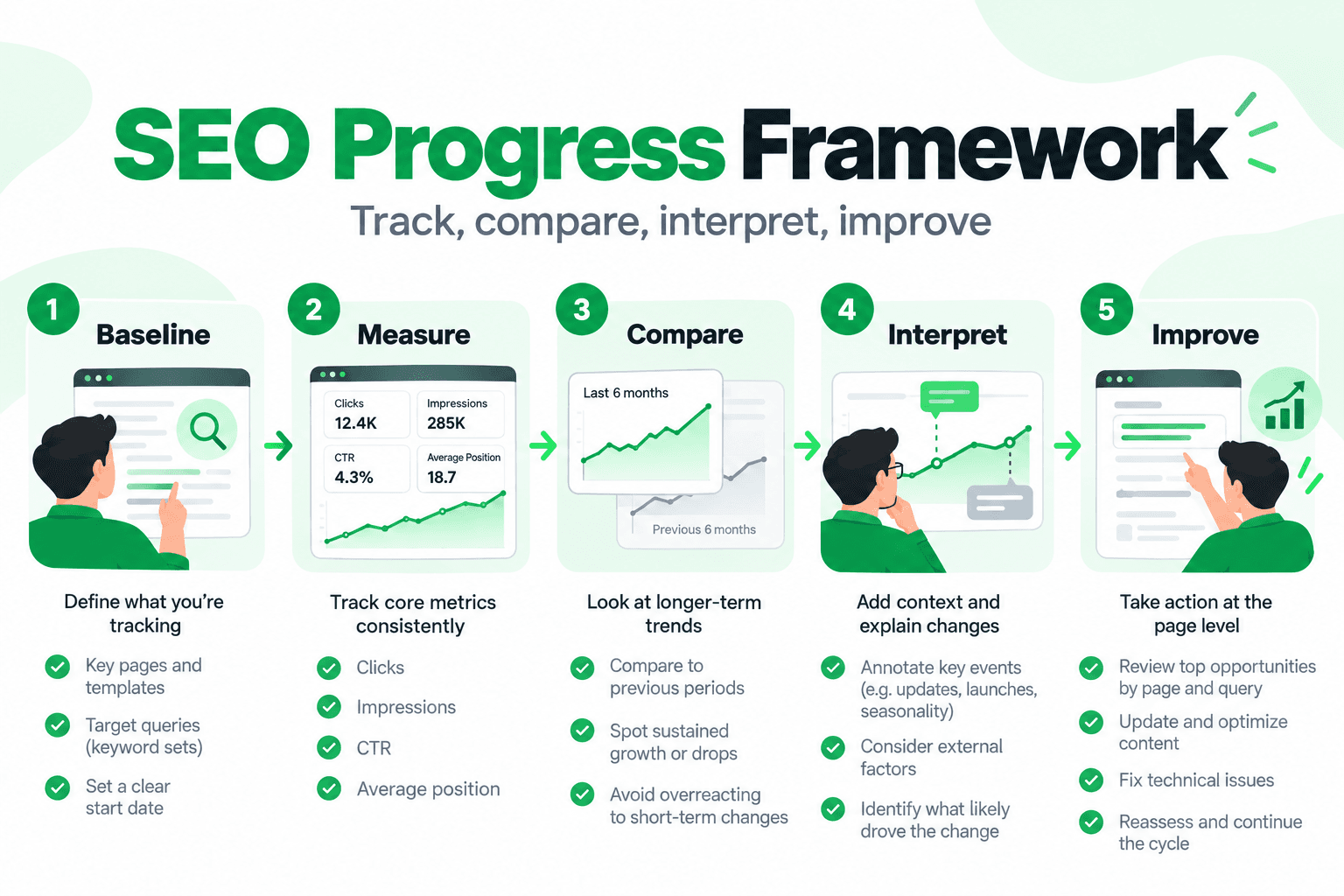
1. What is the goal?
Define what the page, campaign, or SEO change is intended to improve.
2. What is the baseline?
Record the relevant starting performance.
3. Which KPIs match the goal?
Choose measurements that actually help answer the objective.
4. What changed over time?
Compare relevant pages, queries, and periods.
5. What does the combined evidence suggest?
Interpret the trend without pretending that one metric proves the cause.
This framework is intentionally simple.
SEO measurement becomes less useful when reports are filled with disconnected metrics that nobody can act on.
Frequently Asked Questions
How do you measure SEO progress?
Start with a clear SEO objective and record a baseline. Then track the metrics that best match that objective, such as relevant Google Search impressions, clicks, CTR, page and query performance, and useful on-site outcomes. Compare trends over time rather than relying on one snapshot.
What are the most important SEO KPIs to track?
There is no universal KPI list for every website. Search clicks, impressions, CTR, average position, page-level performance, relevant queries, and meaningful site outcomes can all be useful. The best KPI depends on the goal you are measuring.
How do I track SEO in Google Search Console?
Use the Performance report to review clicks, impressions, CTR, average position, queries, pages, and other available dimensions. Compare time periods and investigate which pages or queries are responsible for meaningful changes. See Google's Search Console Performance report documentation.
Is average position the same as my Google ranking?
No. Search Console average position is an aggregated metric based on impressions and the topmost result represented in the report. It should not be interpreted as one fixed rank every user sees. See Google's position documentation.
Are more impressions always a sign of SEO success?
No. More impressions can indicate greater search exposure, but the queries and pages behind that exposure still need to be relevant to your goals.
How often should I check SEO performance?
There is no required frequency. Check often enough to understand meaningful trends without treating normal daily fluctuations as major SEO changes. Weekly or monthly views can be useful when you want to smooth daily volatility and focus on broader direction. See Google's Performance report documentation.
Final Thoughts
SEO progress is easier to understand when you stop looking for one number that proves whether SEO is working.
Clicks, impressions, CTR, average position, page-level data, and on-site outcomes all tell different parts of the story.
Start with a baseline.
Measure what matches the goal.
Compare trends over time.
Look at the pages and queries behind the numbers.
Then decide what the combined evidence actually suggests.
The goal is not to make every metric move upward at once.
It is to understand whether search performance is moving in a useful direction - and to know what deserves investigation next.