

SEO works best when it is considered during website development, not added only after the site is finished. Development choices affect page structure, navigation, metadata, rendering, URLs, and whether search engines can access the information they need.
That does not make developers responsible for every SEO decision. SEO professionals may define search-related requirements, content teams shape useful page content, designers influence usability, and developers turn many of those requirements into working templates, routes, components, responses, and deployment settings.
SEO web development is the process of building those search-related requirements into the development workflow so they can be implemented, tested, and verified before and after launch. The goal is not to guarantee rankings. It is to reduce preventable technical barriers and make priority pages accessible and understandable to search engines and users.
What Is SEO Web Development?
SEO web development means incorporating search-related technical and structural requirements into the way a website is planned and built. Traditional web development focuses on creating working websites and applications, while SEO focuses on helping search engines discover, process, and understand web content while supporting useful experiences for people.
SEO and development overlap whenever a search requirement needs technical implementation. If an important service page must be reachable through normal navigation, for example, a developer can expose it with a standard link and usable destination. That is where SEO becomes part of the development workflow.
How Web Development and SEO Work Together
SEO professionals may define requirements related to page types, metadata, crawlability, canonical URLs, indexability, or search accessibility. Developers implement the required functionality, while content and design teams help make the resulting pages useful and usable. QA then verifies that the intended behavior actually appears in the built website.
Web development and SEO have different jobs, but they need to work together. Developers do not need to own SEO strategy; understanding the technical implications is enough to prevent many avoidable problems. For web developers, SEO-friendly website development is less about special tricks and more about turning clear requirements into consistent implementation.
Why SEO Matters During Website Development
Development decisions can affect whether priority pages are reachable, whether content appears in rendered output, whether metadata and canonical signals are generated correctly, and whether production pages are configured for their intended search behavior.
These decisions do not guarantee indexing or rankings. Google explains how Search works as a process that includes crawling, indexing, and serving results, and meeting technical requirements does not guarantee that a page will be crawled, indexed, or shown prominently.
The practical reason to consider SEO during development is simple: template-level decisions can affect many pages at once. An incorrect canonical rule, inaccessible navigation pattern, or staging directive copied into production can spread beyond a single URL.
Why Fixing SEO Issues After Launch Can Be More Complicated
Some post-launch changes are simple; others become more involved when many pages depend on the same implementation. Changing an established URL structure may require redirects and link updates, while a shared canonical or rendering problem can affect many pages at once.
A staging noindex setting carried into production can also create unintended indexing restrictions. This does not mean every post-launch SEO change is difficult or expensive; it means reusable development decisions deserve early definition and testing.
How to Integrate SEO Into the Web Development Process
A practical way to handle SEO during development is to treat its requirements like any other project requirement: define them, build them, test them, and verify them in production.
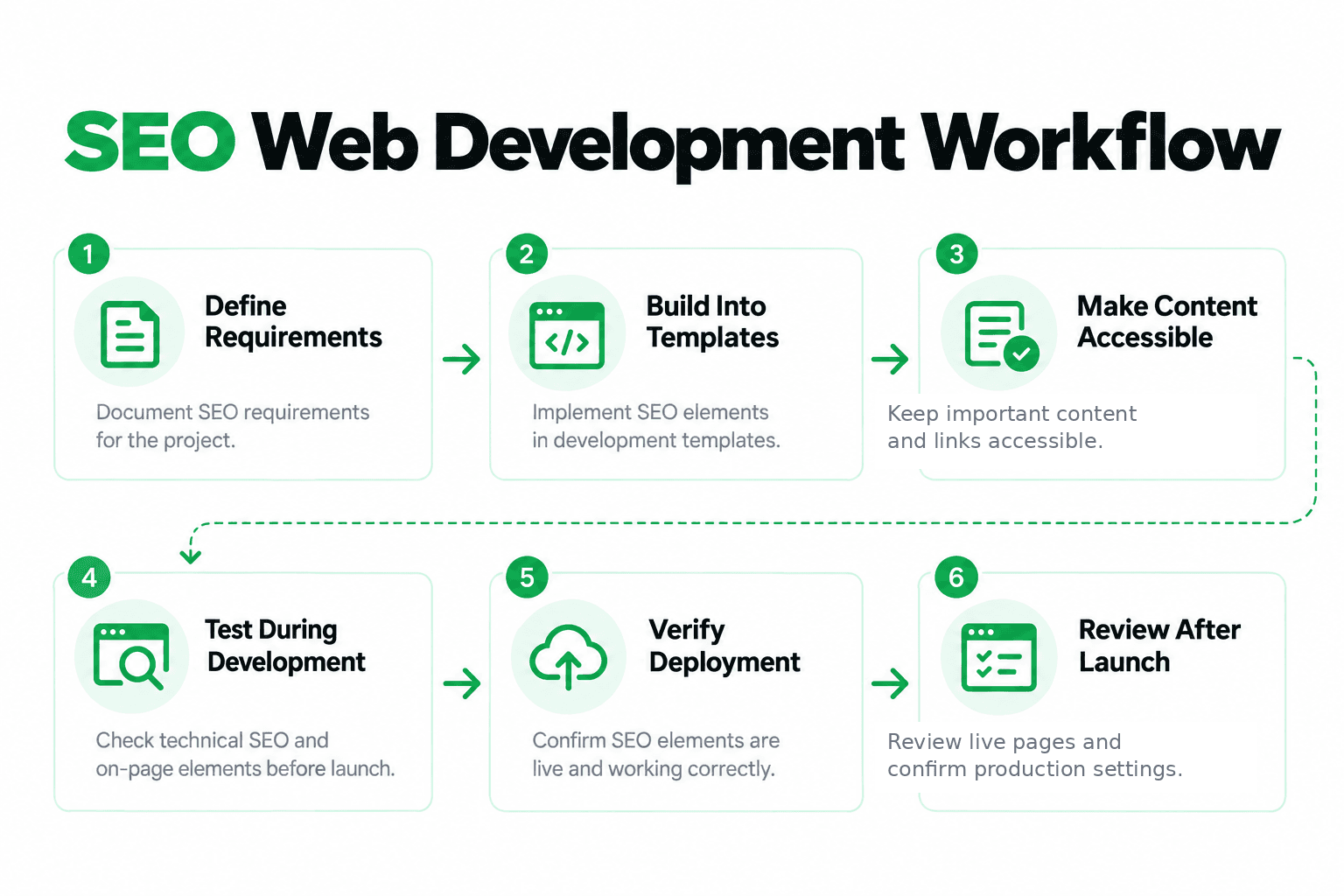
1. Define SEO Requirements Before Coding
“Make the site SEO-friendly” is not a useful development specification. A developer needs requirements that can be implemented and tested. Before coding begins, define items such as:
- important page types and templates;
- URL conventions;
- navigation requirements;
- metadata fields;
- canonical handling;
- intended indexability;
- rendering expectations;
- technical acceptance criteria.
Instead of “Make service pages SEO-friendly,” a useful requirement might say: “Each service-page template must support a unique title, meta description, H1, preferred canonical URL, indexability setting, and internal-link destination.”
That gives the team something concrete to build and QA.
2. Build SEO Considerations Into Templates
Reusable templates and components can help maintain consistent implementation across similar pages. A page template may support:
- page-specific titles;
- meta descriptions;
- canonical URLs;
- logical headings;
- internal links;
- image alternative-text fields;
- structured data where appropriate.
Simply adding those fields is not enough; they must produce the intended output. A dynamic title field is useful only if individual pages can generate appropriate titles instead of repeating the same text.
The detailed behavior of HTML elements belongs in RankCrow's HTML SEO article; the development concern here is making sure the system can generate the required markup reliably.
3. Make Important Content Accessible
Important content and navigation should be available in ways users and search engines can access. Google's crawlable-links guidance recommends links that expose usable destinations instead of depending on script-driven elements without clear URLs.
Developers should also consider when important content becomes available. Depending on the application, content may be delivered through static HTML, server-side rendering, prerendering, client-side JavaScript, or a combination of approaches.
JavaScript itself is not inherently incompatible with SEO. Google's JavaScript SEO documentation explains that Google Search can execute JavaScript, while rendering and resource accessibility still affect what becomes available for processing.
4. Test SEO Requirements During Development
SEO QA should happen before the entire website is finished. For representative templates, check:
- generated page titles and meta descriptions;
- canonical URLs;
- navigation links;
- rendered content;
- indexing directives;
- HTTP responses;
- expected URL behavior.
A bug in a reusable template can spread across many URLs. If a shared template outputs the same canonical everywhere, for example, the problem may affect every page using it. Catching that during development is much easier than finding it after launch.
5. Verify SEO Settings During Deployment
Development, staging, preview, and production environments may use different configuration values. During production deployment, verify:
- intended public URLs;
- canonical hostname and output;
- robots and indexability directives;
- production metadata;
- internal-link destinations;
- HTTPS;
- expected HTTP status codes.
HTTP status codes describe the outcome of a request and help distinguish successful responses, redirects, client errors, and server errors. MDN's HTTP status reference provides the underlying HTTP definitions.
Production should be checked independently rather than assuming staging or development settings transferred correctly.
6. Review Important Pages After Launch
Deployment is not the end of the development workflow. Open representative live pages and confirm that the final output matches the intended implementation. Check key templates, not just the homepage.
Relevant Search Console information can also help verify whether priority URLs are accessible and whether unintended restrictions have appeared. The purpose here is production verification, not full SEO performance tracking.
For deeper crawling and indexing concepts, RankCrow's Search Engine Indexing Guide covers that topic separately.
SEO Coding Considerations for Web Developers
Good SEO coding usually comes down to producing predictable, accessible, and correct output rather than adding special search-engine-only code.
Page Metadata and Canonical Implementation
Developers often control how metadata is generated from application or CMS data, so relevant pages should be able to produce appropriate page-specific values. Canonical URLs also need deliberate implementation.
A rel="canonical" annotation is a strong canonicalization signal, but it does not guarantee that Google will select that exact URL as canonical. The development responsibility is to generate the intended canonical consistently and avoid contradictory signals.
Crawlable Navigation and Internal Links
Navigation should expose useful destinations in a way browsers and crawlers can follow. A system that looks clickable to a person but does not expose meaningful link destinations can create accessibility and crawlability problems.
For example, a menu can use standard destination links while JavaScript controls only the visual interaction. That keeps the interface interactive without hiding the underlying URLs.
For deeper guidance on anchors, page relationships, and link structure, see RankCrow's SEO Internal Linking Strategy Guide.
HTTP Responses, Redirects, and Indexing Directives
Different technical mechanisms solve different problems. A missing page should return a response that accurately represents the missing resource. A permanent URL change may require an appropriate redirect. A page that should not appear in search may require an indexing directive such as noindex.
robots.txt is not the same thing as noindex. Google's noindex guidance notes that a crawler needs access to a page to see its noindex rule; if the URL is blocked from crawling, that directive may not be seen.
Detailed diagnosis belongs in RankCrow's Technical SEO Issues Guide, while the developer's responsibility here is to implement the intended behavior correctly.
Performance and Usability Considerations
SEO-friendly website development also means avoiding unnecessary technical friction. Developers can help by limiting unnecessary JavaScript, managing large assets, supporting responsive layouts, reducing avoidable layout instability, and keeping important functionality reliable.
Page experience should not be reduced to a single performance score. Google's page experience guidance recommends looking at the overall experience rather than treating one score as a guarantee of search performance.
How Rendering and JavaScript Affect SEO Development
Modern websites can render content in several ways. Server-side rendering generates output in response to a request, static rendering can generate pages ahead of time, and client-side rendering can build or update content in the browser. Hybrid approaches combine these patterns.
No single rendering model is automatically best for every website. From an SEO-development perspective, the useful question is whether important content, links, and metadata can be accessed and processed reliably.
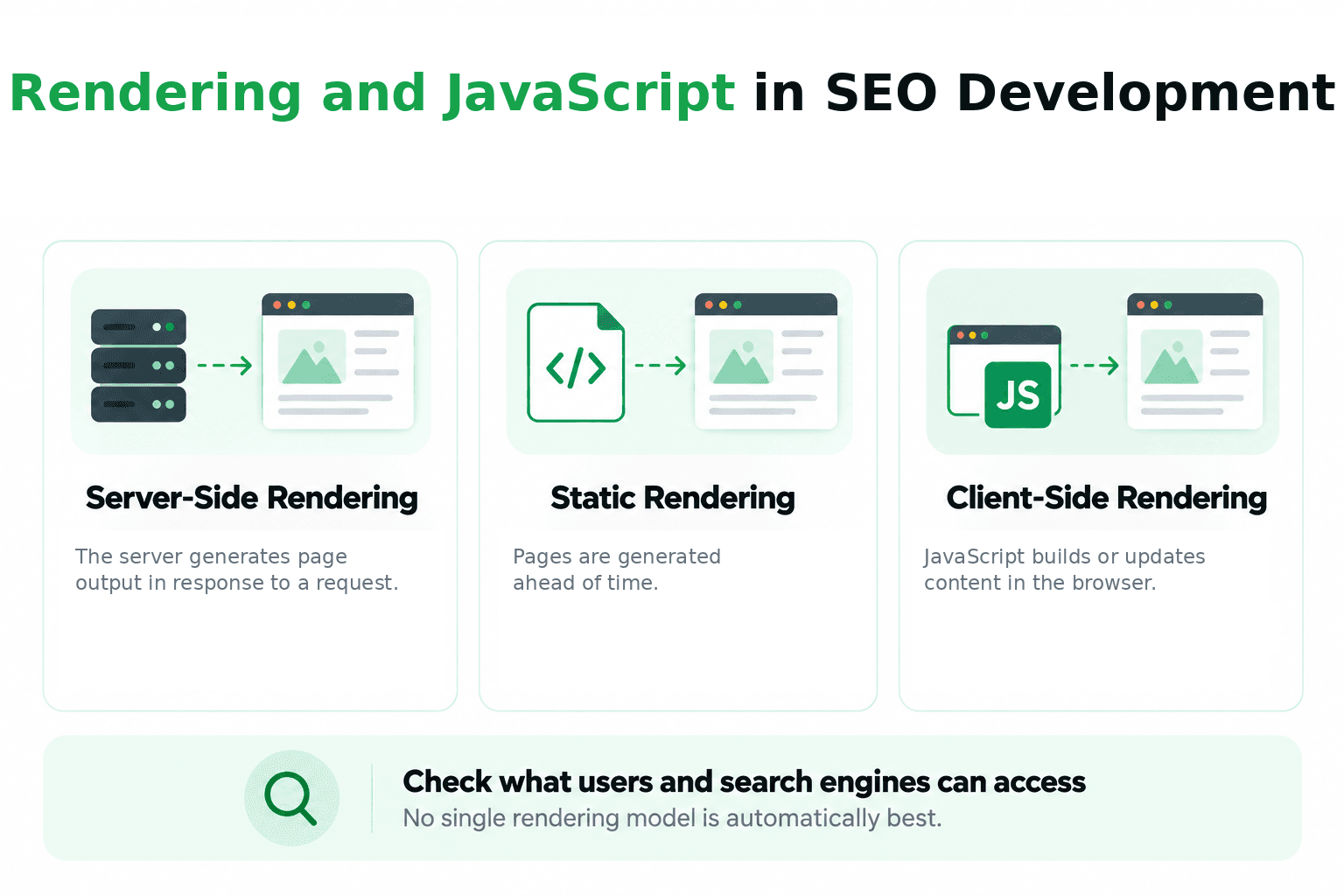
Google Search can process JavaScript with a modern rendering environment, but that does not mean every implementation behaves identically. Rendering dependencies, blocked resources, delayed content, and application behavior can still affect what becomes available.
Check What Search Engines Can Access
A page can look fully functional while important content still depends on a script or interaction. If a service description appears only after a click, for example, the developer should inspect the rendered output and check whether that dependency is actually necessary.
What matters is checking the page that is actually delivered rather than assuming that a page that looks right in the browser exposes everything as intended.
When Specialized JavaScript SEO Testing Is Needed
More specialized testing may be appropriate for large JavaScript applications, dynamically generated content, complex rendering dependencies, content loaded through client-side APIs, or sites where key links and text depend heavily on scripts.
For complex applications, testing should focus on whether essential content and links remain available in the rendered result. This article does not need to become a framework-specific JavaScript SEO tutorial.
Staging, Testing, and Production SEO
Development environments deserve special attention because settings that are appropriate for staging may be harmful in production.

Prevent Unintended Exposure of Staging Environments
Private staging environments should use appropriate access controls when they are not intended to be public. robots.txt is not a security mechanism; crawler directives influence crawler behavior, but they do not provide authentication or protect private data.
Avoid Carrying Staging Directives Into Production
A staging site may intentionally use noindex. The problem begins when the same setting reaches production. Deployment QA should explicitly verify production indexing configuration instead of assuming environment-specific settings changed correctly.
Verify Environment-Specific URLs and Metadata
Verify environment-specific values such as the canonical hostname, absolute URLs where relevant, internal-link destinations, configuration, and production metadata. A site can work correctly in staging and still deploy with production-specific errors.
Practical Example: Adding SEO Checks to a Website Feature
Consider a hypothetical small-business website using a reusable service-page template. The requirement identifies the service topic and URL, and the template supports page-specific titles, headings, canonical URLs, and content. Navigation exposes the page through usable links, QA checks the template, and the live page is reviewed after deployment.
| SEO Requirement | Development Implementation | Verification Method |
|---|---|---|
| Page-specific title | Dynamic title field | Inspect generated metadata |
| Preferred canonical | Canonical URL output | Inspect canonical element |
| Accessible navigation | Standard destination links | Check link targets |
| Available content | Appropriate rendering | Inspect rendered output |
| Indexability | Intended production directives | Verify live configuration |
A requirement becomes an implementation task, and the implementation is then verified.
SEO Web Development Checklist Before Deployment
Before a production release, review representative pages and templates. Check that:
- page titles and metadata are correct;
- canonical URLs are expected;
- important content appears in rendered output;
- navigation and internal links work;
- HTTP responses are appropriate;
- indexing directives are correct;
- no accidental production crawler restrictions remain;
- HTTPS works;
- representative templates have been tested;
- important images and assets load;
- mobile layouts remain usable;
- no obvious deployment-related errors are present.
Passing this checklist does not guarantee indexing or rankings. It reduces the risk of shipping preventable implementation problems.
For broader new-site launch planning beyond development QA, RankCrow's SEO for a New Website article covers that separate workflow.
Common SEO Web Development Mistakes
A few implementation mistakes can undermine otherwise solid development work.
Treating SEO Requirements as an Afterthought
Defining SEO only after development is complete can force teams to retrofit behavior that could have been built into templates from the start.
Allowing Template-Level Errors to Scale
A repeated metadata value, incorrect canonical rule, or broken shared component can affect many URLs. Test representative templates before widespread rollout.
Hiding Important Content or Destinations Behind Fragile Interactions
Important content and navigation should not depend unnecessarily on interactions that make them difficult to access or expose as usable URLs.
Carrying Staging Configuration Into Production
Environment-specific directives, URLs, and metadata should be checked during deployment rather than assumed to be correct.
Skipping Production Verification
A successful deployment does not prove that SEO-related settings are correct. Review representative live pages after release.
Assuming Technical Compliance Guarantees Rankings
Correct technical implementation can support accessibility and processing, but crawlability, indexing, rankings, and visibility are not guaranteed simply because a page meets technical requirements.
How Developers and SEO Teams Can Work Together
The most effective workflow separates responsibilities while keeping communication clear.
| Task | Typical Responsibility |
|---|---|
| Define search-related requirements | SEO / content team |
| Implement technical changes | Development team |
| Test implementation | Development / QA |
| Review search accessibility | SEO / development |
| Verify production deployment | Development / QA |
Responsibilities vary by organization, but requirements should be clear enough to implement and verify. “Fix SEO” is not a useful development ticket.
“Generate a page-specific canonical URL from the production URL for this template and verify it on representative pages” gives the team something it can actually build and test.
Frequently Asked Questions
What is SEO in web development?
SEO in web development means incorporating search-related technical and structural requirements into the way a website is built, tested, and deployed.
How do web development and SEO work together?
SEO defines or informs requirements related to search accessibility and content processing, while developers implement many of those requirements through templates, routes, links, metadata, rendering, responses, and configuration.
Do web developers need to understand SEO?
Developers do not need to own the entire SEO strategy, but basic SEO knowledge helps them implement requirements correctly and avoid preventable technical problems.
Does JavaScript affect SEO?
It can. JavaScript implementation can affect when and how content and links become available. JavaScript itself is not inherently incompatible with SEO, but key content and links should still be checked in the rendered output.
When should SEO be considered during website development?
Ideally, important SEO requirements should be considered during planning and implementation so they can be built into templates and tested before release. Existing websites can still be improved after launch.
Can an SEO-friendly website guarantee higher rankings?
No. Technical accessibility and correct implementation are useful foundations, but they do not guarantee crawling, indexing, rankings, traffic, or other search outcomes.
Final Thoughts: Make SEO Part of the Development Workflow
SEO-aware development is not about adding a special layer of “SEO code” after the site is finished. It means translating search requirements into development tasks, building them into the site, testing the output, and verifying production after deployment.
When developers, SEO professionals, content teams, and QA understand their responsibilities, issues can be caught earlier and implementation becomes easier to verify.
After launch, RankCrow's free page-level SEO Analyzer can help review supported signals such as titles, meta descriptions, headings, links, canonical and indexability-related signals, and HTTPS. It is not a replacement for Search Console, full-site crawling, or specialized developer testing.