
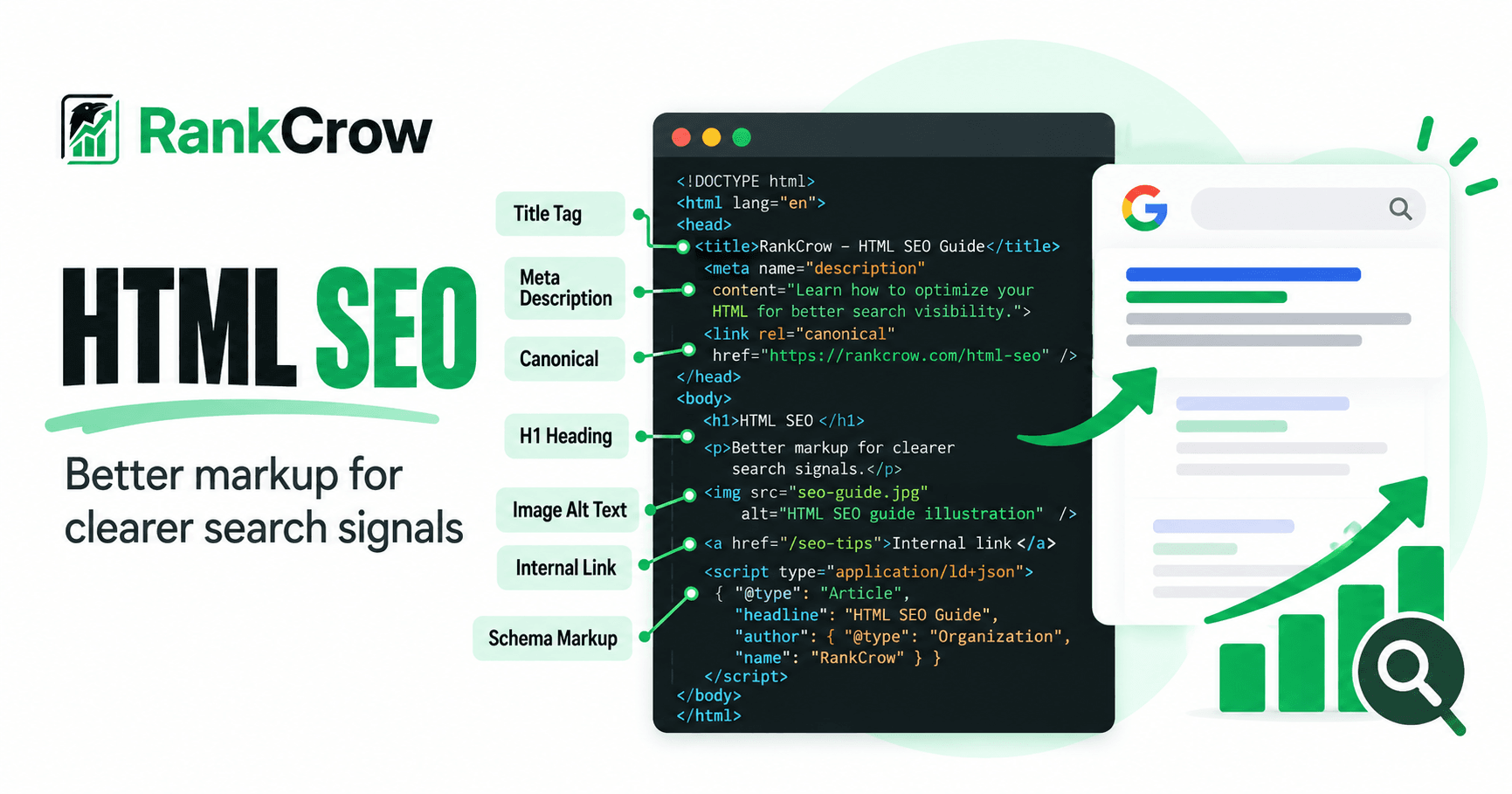
HTML is the structural foundation of a webpage. It tells browsers what content exists, how different pieces of that content relate to one another, and which parts of the document carry specific meaning.
That structure also matters for SEO.
Search engines process page content and markup to understand information such as the page title, headings, links, images, canonical signals, indexing directives, and structured data. Good HTML SEO is therefore less about adding special “SEO tags” and more about making a page clear, accessible, crawlable, and understandable.
That does not mean every HTML element is a ranking factor. It also does not mean placing the same keyword in more tags automatically improves rankings.
The practical goal is simpler: use HTML to communicate the page clearly to users, browsers, assistive technologies, and search engines.
This guide explains which HTML elements deserve SEO attention, how to use them correctly, and which common implementation mistakes can create unnecessary search problems.
What Is HTML SEO?
HTML SEO means structuring and marking up webpage content in ways that make the page understandable and usable for people while also helping search engines access and interpret important page information.
HTML and SEO are related, but they are not the same thing.
HTML is the markup language used to structure webpage content. SEO is the broader discipline of improving a website so useful pages can be discovered, understood, crawled, indexed, and presented appropriately in search.
HTML SEO is therefore one component of SEO—not SEO in its entirety.
For an HTML website, sensible SEO implementation includes meaningful titles, logical headings, normal crawlable links, appropriate image alternatives, correct canonical and indexing markup, sensible document structure, and structured data where it genuinely applies.
The objective is not to add as many SEO-related tags as possible. It is to make the page technically clear and semantically meaningful.
Does HTML Still Matter for SEO?
Yes. HTML still matters, but not because it contains magical ranking tags.
HTML communicates important page information through elements such as <title>, headings, links, image attributes, canonical markup, robots directives, and structured data.
Incorrect HTML implementation can also cause real problems. An important page might accidentally containnoindex. A canonical might point to the wrong URL. Navigation might look clickable to a user but not be implemented as a normal crawlable link. Important metadata might even appear after invalid markup inside<head>.
At the same time, technically clean HTML does not automatically earn higher rankings.
A perfectly valid page can still be unhelpful, irrelevant, or poorly matched to search intent. HTML supports SEO; it does not replace useful content or the wider SEO process.
HTML Elements That Matter for SEO
Several HTML elements deserve particular attention because they communicate important page information or affect how users and search systems interact with the content.
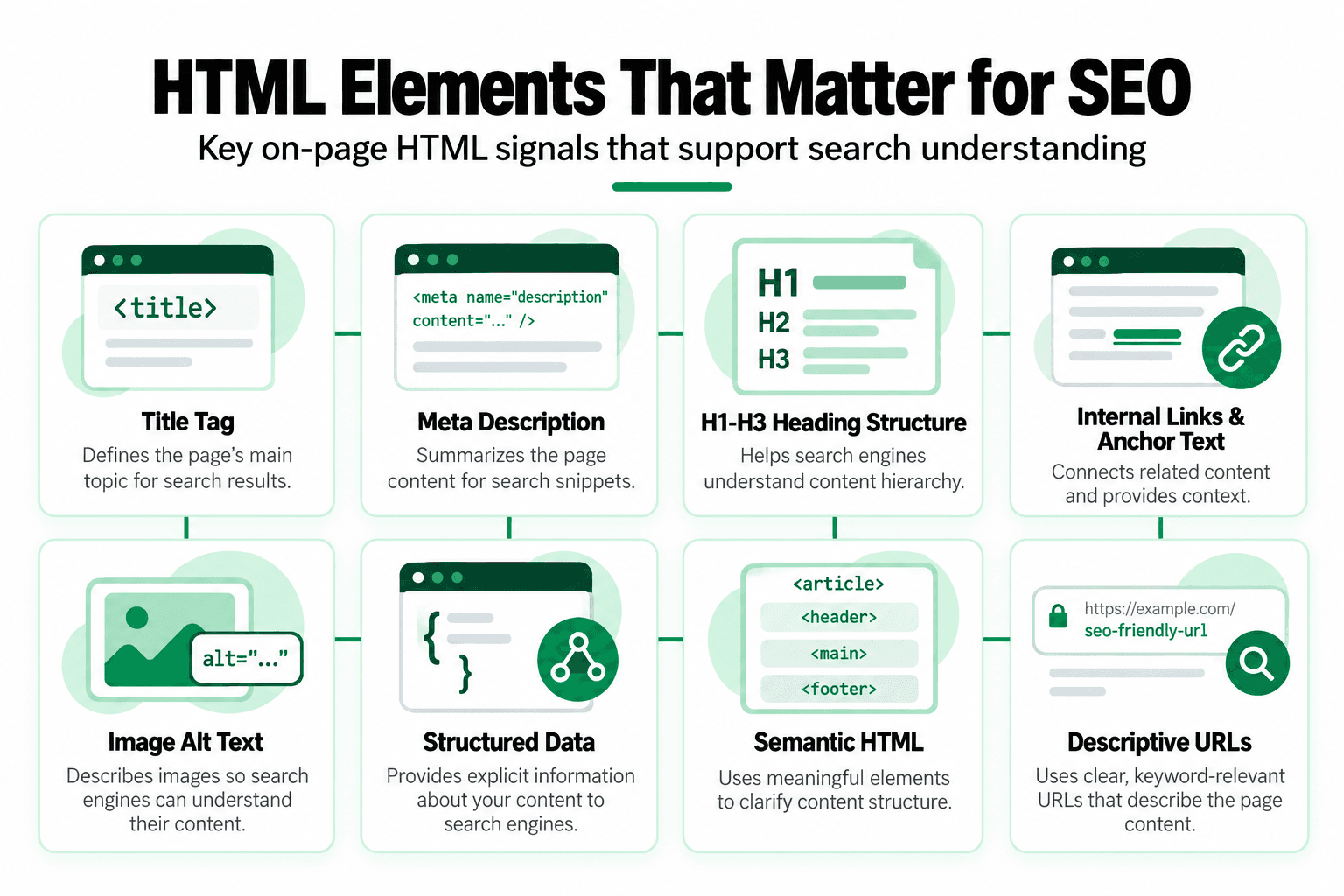
The HTML Title Element
The <title> element belongs inside the document <head>:
<title>Beginner's Guide to Technical SEO</title>It provides an important description of the page and is one of the sources Google can use when generating a title link in search results.
The important word here is source.
Google does not promise to display the HTML title exactly as written. It can generate title links from multiple signals, including the <title> element and other prominent page text. Google: Influencing title links in Search
A useful title should clearly describe the page, reflect its main topic, distinguish it from unrelated pages, and make sense to a real searcher.
Avoid turning title optimization into a rigid character-count formula. RankCrow can check title length as a practical page-level benchmark, but that should not be presented as a universal Google ranking requirement.
In common SEO language, people often call this the title tag, although technically <title> is an HTML element.
Meta Description
A meta description usually appears inside the <head>:
<meta
  name="description"
  content="Learn how technical SEO helps search engines access and understand important pages."
>
Its job is to summarize the page concisely.
A useful meta description helps a potential visitor understand what the page offers. It should accurately describe the content rather than serve as a container for repeated keywords.
For example, something like:
SEO services, SEO company, best SEO, SEO expert, SEO agency, SEO services near meis not a useful page summary.
Also, do not confuse the meta description with the older meta keywords tag. They are different elements with very different relevance to modern Google Search.
Heading Elements: H1 to H6
HTML provides heading levels from <h1> through <h6>.
A simple hierarchy might look like:
<h1>HTML SEO Guide</h1>

<h2>Important HTML Elements</h2>

<h3>Title Element</h3>
<h3>Meta Description</h3>

<h2>Common HTML SEO Mistakes</h2>
Headings make content easier to scan and communicate its organization.
The priority should be a logical hierarchy rather than manufacturing headings merely to create more keyword placements.
It is also unnecessary to convert “one H1” into an absolute Google rule. A clean, understandable hierarchy matters more than treating heading counts as a ranking formula.
RankCrow can review heading structure and flag potential issues, but its checks should be understood as page-analysis guidance rather than Google mandates.
Semantic HTML Tags
Semantic HTML uses elements whose names communicate the role of the content they contain.
For example:
<header>
<nav>
<main>
<article>
<section>
<footer>
A simple article might be structured as:
<main>
  <article>
    <h1>HTML SEO Guide</h1>

    <section>
      <h2>Why HTML Structure Matters</h2>
      <p>...</p>
    </section>
  </article>
</main>
Semantic HTML can improve document clarity, accessibility, and maintainability.
That does not mean every <main>, <article>, <nav>, or <section> element provides an individual ranking boost.
You do not need perfectly semantic HTML to rank in Google. Use semantic elements when they accurately describe the content because they make the document easier to understand and maintain—not because each tag supposedly earns SEO points.
That distinction is important because the purpose of HTML SEO is meaningful markup, not tag-based ranking tricks.
Links and Anchor Elements
A normal HTML link should generally be an anchor element with a usable href:
<a href="/services/">
  View our services
</a>
Google says links are generally crawlable when they use an <a> element with an href attribute. It also recommends descriptive anchor text that helps both people and Google understand the destination. Google: Make your links crawlable
Compare that with:
<span onclick="openServices()">
  View our services
</span>
The second element may behave like a link in a browser interface, but it should not be relied on as a standard crawlable hyperlink.
Similarly:
<a onclick="goToServices()">
  View our services
</a>
lacks the normal href structure Google recommends for reliable crawlability.
Good HTML links should lead to real destinations, help users navigate, and use wording that makes sense in context.
Internal linking strategy is a much broader subject. For deeper treatment, see RankCrow’s SEO Internal Linking Strategy Guide.
Image HTML and Alt Text
A basic image might look like:
<img
  src="/images/html-seo-example.webp"
  alt="Example of an HTML document structure"
>
The src attribute identifies the image resource, while alt provides alternative text where appropriate.
Useful alt text describes the image according to its purpose and context.
For example:
alt="Diagram showing title, headings, links, and image markup in an HTML page"is much more useful than:
alt="html seo seo html keywords best html seo optimization"Alt text is not a hidden keyword field.
Its primary purpose is meaningful alternative information, especially for accessibility. If the image genuinely relates to the topic, relevant wording can appear naturally—but keywords should not be forced into every alt attribute.
RankCrow’s Image Optimization SEO Guide covers image optimization in more depth.
Canonical and Robots-Related HTML
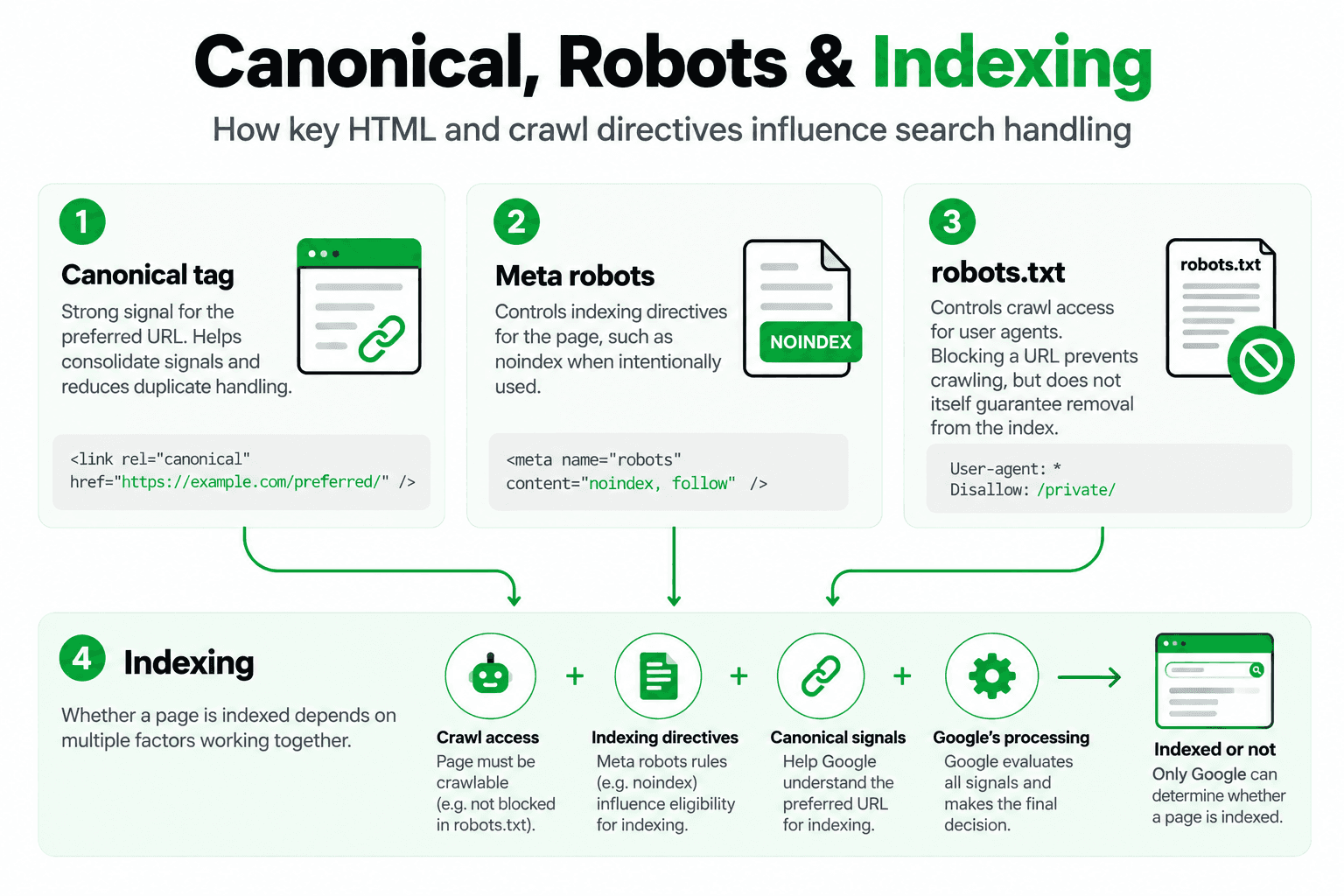
Canonical and robots-related markup deserve careful implementation because mistakes here can affect indexing and URL selection.
A canonical element can look like this:
<link
  rel="canonical"
  href="https://example.com/preferred-page/"
>
Google describes rel="canonical" as a strong canonicalization signal, but it is still not an absolute command. Google can select a different canonical URL when its systems determine another version is more appropriate. Google: Canonicalization
A robots meta directive might look like:
<meta
  name="robots"
  content="noindex"
>
noindex tells supporting search engines not to index the page after they crawl and see that directive.
This is different from robots.txt.
A robots.txt rule controls crawler access to a URL. It does not function as an HTML indexing directive.
A particularly important implementation detail is that Google must be able to crawl a page in order to see its noindex rule. If the URL is blocked in robots.txt, Googlebot may never see the noindex directive, and the URL can still potentially appear in search results based on other information such as links pointing to it. Google: Block Search indexing with noindex
So this combination is not a reliable way to remove a URL from Google:
robots.txt blocks page
+
HTML contains noindex
If you need Google to process noindex, the crawler must be able to access the page and see the directive.
This distinction is easy to miss and is one reason crawling and indexing settings should be implemented carefully.
For deeper treatment, see RankCrow’s Search Engine Indexing Guide. For broader page-level technical problems, see the Technical SEO Issues Guide.
Structured Data in HTML
Structured data provides machine-readable information about the content of a page.
A common implementation uses JSON-LD:
<script type="application/ld+json">
{
  "@context": "https://schema.org",
  "@type": "Article",
  "headline": "HTML SEO Guide"
}
</script>
Google uses structured data to better understand page content and to determine eligibility for certain enhanced search appearances. However, eligibility does not guarantee that a rich result will appear. Google: Structured data introduction
Schema.org vocabulary and Google-supported Search features are not the same thing.
Schema.org contains many types and properties. Google Search supports particular structured-data features with its own documented requirements. Google recommends using Search Central documentation for Google Search behavior rather than assuming every Schema.org property has a Google Search feature attached to it.
So do not assume:
Schema type exists → Google will display a rich result.And do not assume:
Adding schema → higher rankings.Structured data should accurately describe content that genuinely exists on the page.
RankCrow can detect structured-data presence on an analyzed page, but that detection does not guarantee eligibility, a rich result, or a ranking improvement.
For deeper implementation guidance, see RankCrow’s Schema Markup Examples Guide.
Where Should SEO Keywords Appear in HTML?
This is where HTML SEO is often oversimplified.
People sometimes look for a fixed list of HTML locations where an exact keyword must appear.
A page’s topic can naturally be reflected in its title, main heading, relevant subheadings, body copy, useful anchor text, and descriptive image alt text where the image genuinely warrants it.
But these are not boxes that all need the same exact-match phrase.
Imagine a page about repairing leaking faucets. Natural wording might include “faucet repair,” “fixing a leaking faucet,” “dripping faucet,” “plumbing repair,” and “replacing worn faucet parts.”
Repeating exactly the same phrase in every heading, anchor, image alternative, and paragraph would not make the page more useful.
Search intent, meaning, and natural writing come first.
Google’s spam policies identify unnatural repetition of words or phrases intended to manipulate rankings as keyword stuffing. The HTML therefore needs to support the content rather than turn every element into another keyword container. Google Search spam policies
Keyword placement is a broader topic. For HTML, the principle is simple: reflect the topic naturally where it genuinely belongs.
What About the Meta Keywords Tag?
Older pages sometimes contain markup such as:
<meta
  name="keywords"
  content="seo, html seo, search optimization"
>
For Google Search, there is no reason to treat this as a modern SEO requirement.
Google’s current documentation lists the metadata it supports for Search, and the meta keywords tag is not a supported ranking or indexing mechanism. Google has long ignored it for web search. Google: Meta tags and attributes supported by Search
So filling the tag with phrases such as:
html seo, seo html, seo code, html keywords, best html seodoes not provide a useful Google SEO strategy.
If you encounter the tag on an older site, focus instead on meaningful titles, headings, page content, links, image attributes, canonicalization, indexing controls, and other current page-level signals.
HTML SEO for Developers
Developers have significant influence over SEO implementation because eventually many SEO requirements become code.
A strong content strategy can still run into problems if the final page outputs incorrect or inaccessible markup.
Developers should think about SEO during implementation rather than trying to bolt it onto a broken page afterward.
For example, imagine every service page outputs:
<title>Our Website</title>The editorial team cannot fully solve that through better writing. The template needs to output meaningful page titles.
Likewise, if important navigation is built from script-driven elements instead of normal crawlable links, the development implementation deserves attention.
The same applies to canonical tags, robots directives, image markup, structured data, and content that only appears after rendering.
Good SEO coding is not about adding special ranking code. It is about ensuring the page outputs clear, accessible, crawlable, and technically appropriate markup.
How to Review SEO in Your Source Code
A practical source-code review can begin with two areas: the document <head> and the page body.
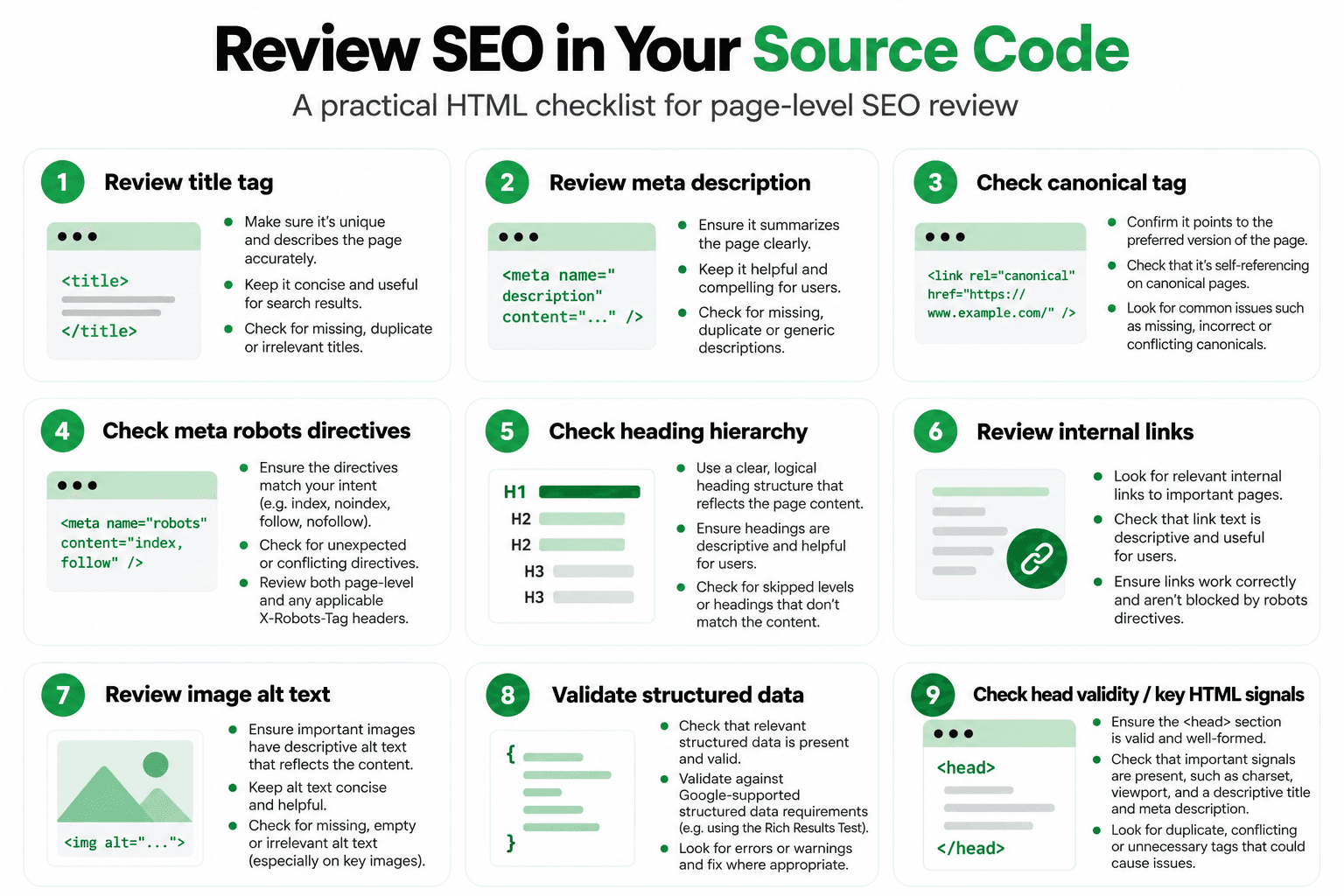
Document Head
- title
- meta description
- canonical
- robots directives
- relevant structured data
One often-overlooked issue is valid head markup.
Google says that if it encounters an invalid element inside <head>, it may treat that point as the end of the head and ignore metadata that appears after it. Google specifically lists elements such as <iframe> and <img> as examples that should not appear there. Google: Use valid page metadata
That means this kind of structure can create unnecessary risk:
<head>
  <title>Example Page</title>

  <img src="/logo.webp">

  <link rel="canonical" href="https://example.com/page/">
  <meta name="robots" content="index,follow">
</head>
The image does not belong in <head>. Important metadata should remain inside valid head structure.
Page Body
- H1–H6 hierarchy
- main content
- links
- image alt attributes
- semantic structure
Ask practical questions: Does the title describe the page? Is the canonical what you expect? Has an important page accidentally been marked noindex? Are links real anchor links? Does the main content exist in the rendered page? Are images described appropriately?
There is also an important limitation to View Source.
On a JavaScript-heavy website, the original source HTML may not be identical to the final rendered DOM. Search engines can process rendered content, so original source alone does not necessarily show everything a modern page ultimately presents.
When debugging these pages, rendered output and tools such as Search Console’s URL Inspection can provide more useful context than raw View Source alone.
Common HTML SEO Mistakes
Most HTML SEO problems are not mysterious algorithm issues. They are usually ordinary implementation mistakes: missing or generic titles, misleading metadata, confusing heading structures, script-only navigation, keyword-stuffed headings or alt text, wrong canonical URLs, accidental noindex, important content that is difficult to access, invalid metadata placement inside <head>, malformed or irrelevant structured data, and reliance on obsolete meta-keyword tactics.
Another mistake is assuming that more markup automatically means better SEO.
It does not.
A page does not need additional headings, additional schema, additional keywords, or additional semantic wrappers simply to look optimized.
Every element should have a legitimate purpose.
Is Clean HTML Enough for SEO?
No.
Excellent HTML cannot compensate for content that fails to satisfy the user’s need.
A page can have perfect titles, headings, semantic markup, crawlable links, valid structured data, and immaculate source code yet still provide little value to the person searching.
SEO involves broader areas such as content quality, search intent, site architecture, internal linking, crawlability and indexability, performance and page experience where relevant, reputation, and other contextual signals.
HTML provides the structural layer that supports those areas.
It does not replace them.
RankCrow’s What Is On-Page SEO? Guide explains the broader page-level framework, while the SEO Components article covers the wider parts of SEO.
Where RankCrow Fits Into HTML SEO
RankCrow is a page-level SEO analyzer.
It can help surface page-level HTML and SEO signals that are worth reviewing, including title and meta information, headings and hierarchy, content, keyword presence and density, internal/external/nofollow links found on the analyzed page, images and ALT text, canonical signals, indexability and robots-related signals, viewport configuration, HTTPS, Open Graph, Twitter/X Cards, structured-data detection, and the RankCrow SEO Score.
That makes RankCrow useful when reviewing the HTML and SEO signals of an individual page.
It does not mean RankCrow tells you exactly what Google wants.
RankCrow also does not currently provide full-site crawling, automatic HTML fixes, backlink analysis, rank tracking, AI recommendations in the Free analyzer, or ranking guarantees.
The RankCrow SEO Score is a RankCrow page-analysis metric—not a Google ranking score.
You can use RankCrow’s Free SEO Analyzer to inspect an individual webpage and identify page-level signals that may deserve further review.
Frequently Asked Questions
What is HTML SEO?
HTML SEO is the practice of using webpage structure and markup so important page information remains clear and accessible to people, browsers, assistive technologies, and search engines. It includes areas such as titles, headings, links, image attributes, canonical markup, robots directives, and structured data where appropriate.
Which HTML tags are important for SEO?
There is no fixed list of HTML tags that independently guarantees rankings. Important page-level markup includes the title element, headings, anchor links, image attributes, canonical elements, robots directives, and structured data where relevant. Their value comes from communicating or controlling useful page information, not from acting as individual ranking bonuses.
Where should SEO keywords go in HTML?
A page’s topic can naturally appear in its title, main heading, relevant subheadings, body content, useful anchor text, and appropriate image alt text. You do not need the exact same phrase in every element. Search intent, meaning, readability, and usefulness come first.
Does semantic HTML improve SEO?
Semantic HTML can make document structure clearer and can improve accessibility and maintainability. Elements such as main, article, nav, and section can describe content roles more clearly, but they should not be treated as automatic ranking boosts.
Is the meta keywords tag useful for SEO?
Not for Google Search. It should not be treated as a modern Google indexing or ranking mechanism. Focus on useful page content and current HTML elements that actually communicate meaningful information about the page.
Do I Need to Know HTML to Do SEO?
You do not need advanced programming skills for every SEO task, but understanding basic HTML is extremely useful. It helps you inspect titles, headings, links, canonical elements, indexing directives, image markup, structured data, and other page-level signals that can affect how a webpage is implemented and interpreted.
Final Thoughts
HTML SEO is not about finding a hidden collection of tags that pushes a page higher in search results.
It is about building a clear document.
Use the title to describe the page. Use headings to organize ideas. Use real <a href> links to connect useful resources. Describe images appropriately. Keep important metadata inside valid <head> markup. Handle canonical and indexing directives carefully. Add structured data only when it accurately represents the page.
Most importantly, avoid turning HTML elements into keyword containers.
Good markup supports good SEO because it helps content remain clear, accessible, crawlable, and understandable.
But HTML remains one part of the wider SEO process.
The strongest implementation is one where useful content and meaningful markup work together, rather than one where the source code has been filled with supposed ranking tricks.