
What Is Schema Markup?
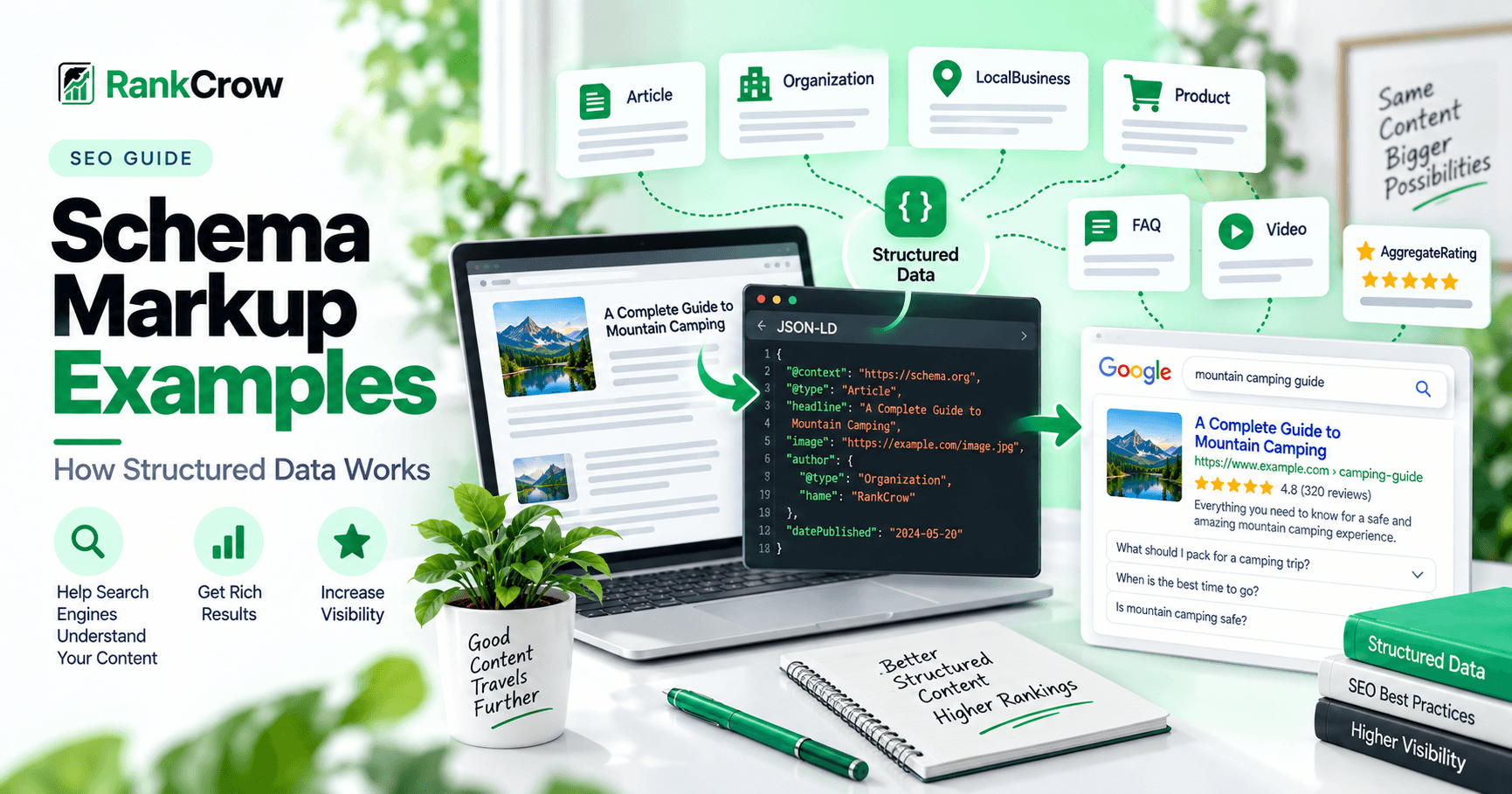
Structured data can make webpage information easier for search engines to interpret.
Instead of leaving a search engine to infer every detail from visible page content alone, schema markup provides additional machine-readable information about what the page represents.
That information can describe an article, organization, local business, product, rating, video, webpage, and many other types of content.
This guide explains how schema markup works, how Schema.org and JSON-LD fit together, and how to use practical schema markup examples without overstating what structured data can do.
Schema markup does not replace visible content. It describes real content already represented on the page.
Good structured data should reflect the real page and entity rather than create a separate version of the truth for search engines.
What Is Structured Data?
Structured data is a standardized format used to describe information and classify page content.
Google can use structured data to better understand certain types of content and, for supported features, may use it when determining whether a page is eligible for enhanced search appearances.
The terms schema markup and structured data are often used interchangeably in SEO discussions, but they are not exactly the same thing.
Structured data is the broader concept.
Schema.org provides many of the types and properties commonly used to describe entities.
JSON-LD, Microdata, and RDFa are formats that can be used to express structured data.
In practical SEO work, JSON-LD is commonly used because it can be added in a separate script block without mixing most of the markup directly into visible HTML.
How Schema Markup Works
A webpage contains visible content for users.
Structured data adds a machine-readable description of that same content.
A simplified relationship looks like this:
Page Content → Structured Data → Search Engine Processing → Eligible Search Features
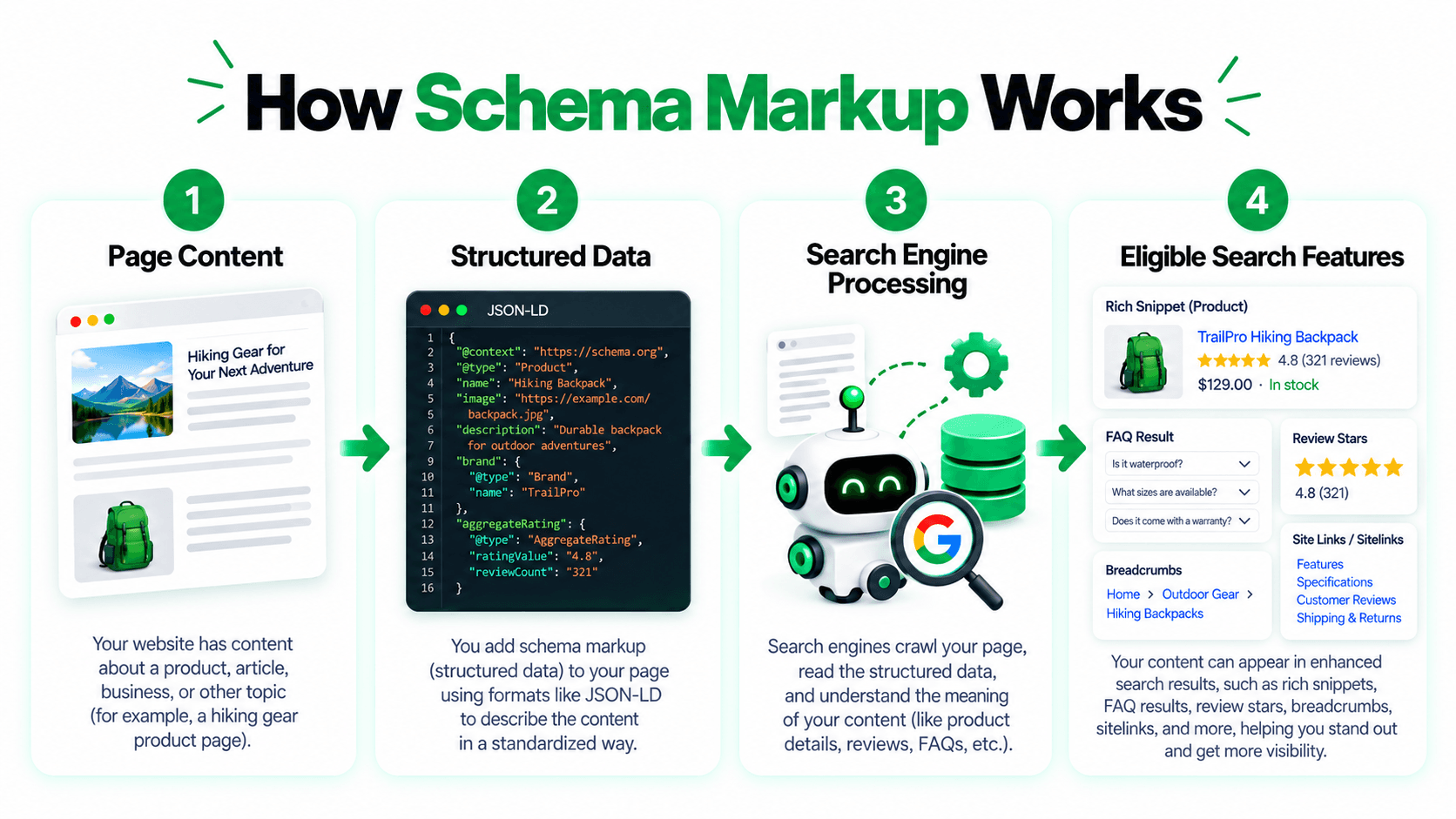
The final step requires careful wording.
Structured data can help a search engine understand page information and may make content eligible for supported search features.
It does not mean the page will rank higher, definitely receive a rich result, or have every Schema.org type reflected as a Google Search feature.
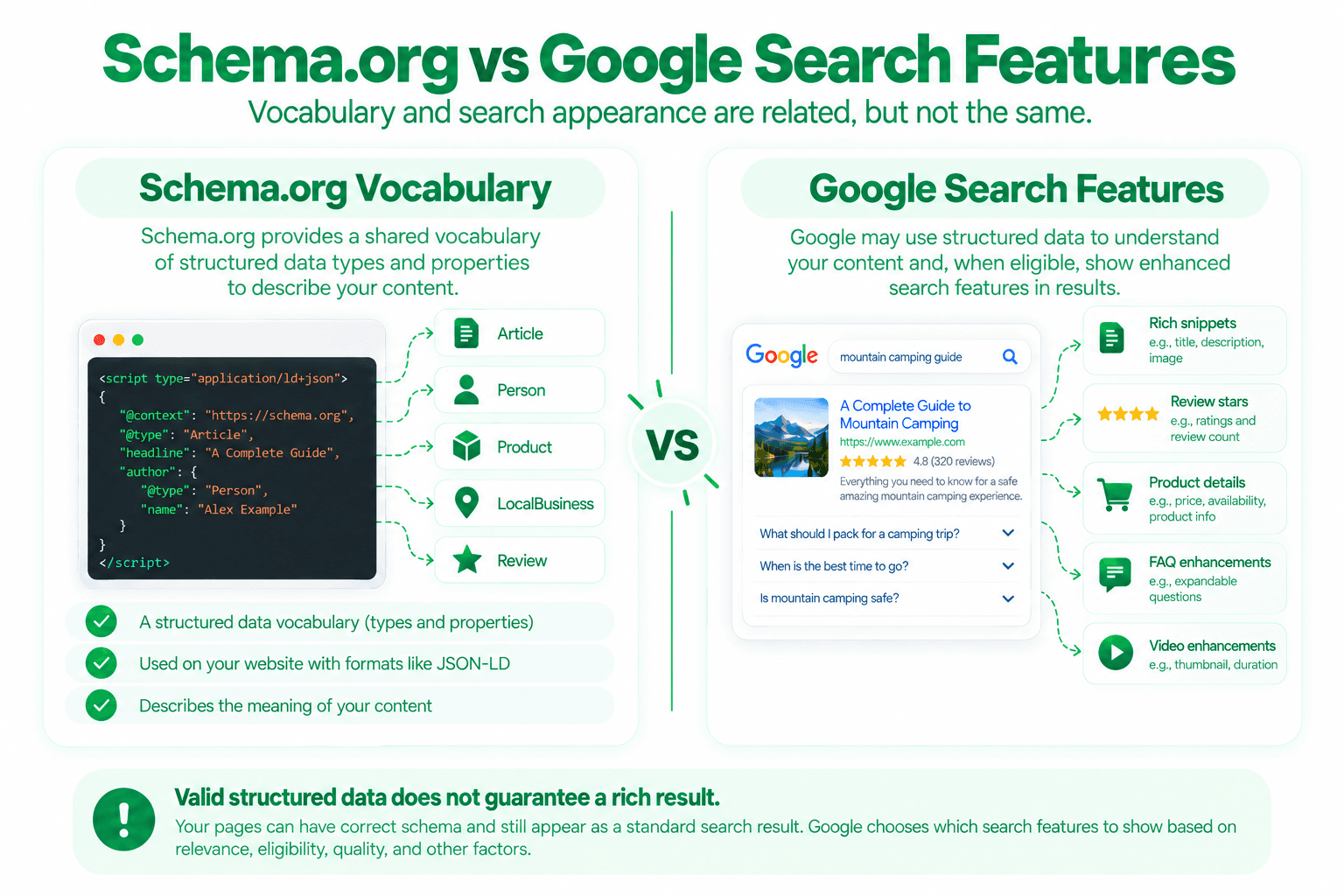
A valid Schema.org implementation and Google rich-result eligibility are related but separate questions.
Why Is Schema Markup Important?
People often ask why is schema important if search engines can already read webpages.
One useful answer is clarity.
Structured data can provide explicit information about what an entity is, who created content, which organization owns a website, where a local business operates, what a product costs, how a rating is calculated, or which media object is a video.
This can reduce ambiguity.
For Google-supported structured-data types, correct markup may also make content eligible for richer search presentations.
But structured data should not be treated as a ranking shortcut.
A page still needs useful content, crawlability, indexability, strong page structure, and relevant SEO signals.
Schema.org and JSON-LD Explained
Two terms appear constantly in structured-data discussions: Schema.org and JSON-LD.
They solve different parts of the problem.
Schema.org
Schema.org provides a shared vocabulary for describing entities and relationships.
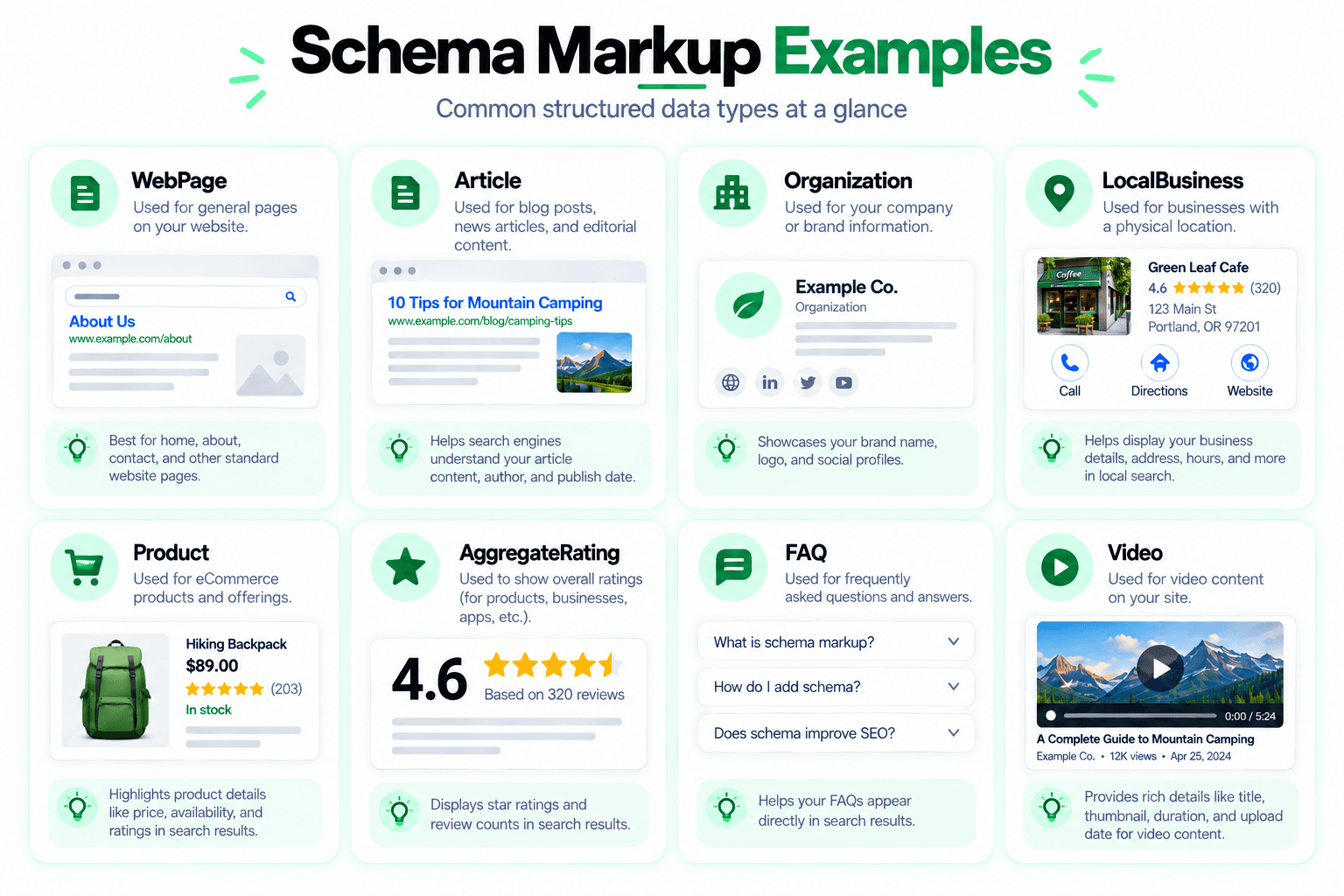
Common types include WebPage, Article, Organization, LocalBusiness, Product, AggregateRating, and VideoObject.
JSON-LD
JSON-LD is a format for expressing linked structured data.
<script type="application/ld+json">
{
  "@context": "https://schema.org",
  "@type": "Organization",
  "name": "Example Company",
  "url": "https://example.com"
}
</script>
The @context tells the parser which vocabulary is being used.
The @type identifies the entity type.
The remaining properties describe the entity.
WebPage Schema Example
A webpage schema example can describe a general webpage.
<script type="application/ld+json">
{
  "@context": "https://schema.org",
  "@type": "WebPage",
  "name": "Free SEO Analyzer",
  "url": "https://example.com/free-seo-analyzer",
  "description": "Analyze supported on-page and technical SEO signals."
}
</script>
This is a simple illustration, not a universal template.
The properties you use should match the actual page.
You do not need to add every possible Schema.org property.
Use properties that accurately describe the content and entity.
A common mistake is copying a large schema template filled with irrelevant fields simply because a generator produced them.
Article Schema Example
Article schema is commonly used for articles, blog posts, news content, and similar editorial pages.
Google supports Article, NewsArticle, and BlogPosting structured data and may use relevant properties to better understand article details.
<script type="application/ld+json">
{
  "@context": "https://schema.org",
  "@type": "Article",
  "headline": "Schema Markup Examples: How Structured Data Works",
  "image": "https://example.com/images/schema-markup-guide.webp",
  "datePublished": "2026-09-14",
  "dateModified": "2026-09-14",
  "author": {
    "@type": "Organization",
    "name": "RankCrow"
  },
  "publisher": {
    "@type": "Organization",
    "name": "RankCrow"
  },
  "mainEntityOfPage": {
    "@type": "WebPage",
    "@id": "https://example.com/seo-guides/schema-markup-examples"
  }
}
</script>
This example should only be used where the page is genuinely an article.
Do not mark a service page or product page as an Article simply because the template is easy to copy.
Representative images used in markup should accurately represent the page and remain accessible.
For broader image implementation guidance, see the Image Optimization SEO Guide.
Organization Schema Example
Organization schema markup describes a company, brand, institution, nonprofit, or other organization.
<script type="application/ld+json">
{
  "@context": "https://schema.org",
  "@type": "Organization",
  "name": "Example Company",
  "url": "https://example.com",
  "logo": "https://example.com/logo.png",
  "contactPoint": {
    "@type": "ContactPoint",
    "contactType": "customer support",
    "email": "support@example.com"
  }
}
</script>
The values should reflect real organization information.
Do not invent locations, phone numbers, social profiles, ratings, awards, or other properties simply to make the markup look more complete.
LocalBusiness Schema Example
schema.org LocalBusiness markup can describe businesses with a genuine local presence.
Examples may include restaurants, stores, clinics, repair businesses, salons, or local offices.
<script type="application/ld+json">
{
  "@context": "https://schema.org",
  "@type": "LocalBusiness",
  "name": "Example Repair Company",
  "url": "https://example.com",
  "telephone": "+1-555-555-0100",
  "address": {
    "@type": "PostalAddress",
    "streetAddress": "100 Example Street",
    "addressLocality": "Houston",
    "addressRegion": "TX",
    "postalCode": "77002",
    "addressCountry": "US"
  }
}
</script>
Where appropriate, use the most specific relevant subtype. For example, a restaurant may use Restaurant rather than only LocalBusiness.
This is a simplified example. Google-supported LocalBusiness search features can have their own current required and recommended properties, so check the documentation for the relevant business type before deployment.
The structured data should match the visible business details on the page.
Product Structured Data Example
Product structured data can describe information about a product and related offers.
<script type="application/ld+json">
{
  "@context": "https://schema.org",
  "@type": "Product",
  "name": "Example SEO Book",
  "image": "https://example.com/images/seo-book.jpg",
  "description": "A practical introduction to technical and on-page SEO.",
  "brand": {
    "@type": "Brand",
    "name": "Example Publisher"
  },
  "offers": {
    "@type": "Offer",
    "priceCurrency": "USD",
    "price": "29.00",
    "availability": "https://schema.org/InStock",
    "url": "https://example.com/products/seo-book"
  }
}
</script>
The markup should reflect the real product page.
Do not add fake prices, fake availability, or information that is not supported by the visible page and real product data.
This is a simplified product example. If you are targeting a specific Google product feature, review the current requirements for Product snippets or merchant listings before implementation.
AggregateRating Schema Example
AggregateRating schema describes a summarized rating based on multiple individual ratings.
<script type="application/ld+json">
{
  "@context": "https://schema.org",
  "@type": "Product",
  "name": "Example Product",
  "aggregateRating": {
    "@type": "AggregateRating",
    "ratingValue": "4.6",
    "reviewCount": "128"
  }
}
</script>
This is an area where structured data can become risky if values are invented.
Do not create rating values simply to try to obtain stars in search.
The numbers should represent real rating data.
Google also restricts self-serving review markup for certain Organization and LocalBusiness contexts where the entity controls reviews about itself.
A technically valid JSON-LD block can still violate Google's search-feature guidelines.
FAQ Schema Example
FAQ schema uses the FAQPage type.
A simple faq schema example may look like this:
<script type="application/ld+json">
{
  "@context": "https://schema.org",
  "@type": "FAQPage",
  "mainEntity": [
    {
      "@type": "Question",
      "name": "What is schema markup?",
      "acceptedAnswer": {
        "@type": "Answer",
        "text": "Schema markup is structured information that describes webpage content in a machine-readable format."
      }
    }
  ]
}
</script>
The question and answer should represent real content visible to users.
Do not place FAQ text only in structured data when the page does not meaningfully present that information to users.
FAQPage remains part of the Schema.org vocabulary, but Google currently does not list FAQ as a general supported structured-data Search feature in its main feature overview.
Use FAQ markup because it accurately describes content where appropriate, not because of an outdated promise of a Google FAQ rich result.
Video Schema Markup Example
VideoObject can describe a video and its important metadata.
A simple video schema markup example:
<script type="application/ld+json">
{
  "@context": "https://schema.org",
  "@type": "VideoObject",
  "name": "How Schema Markup Works",
  "description": "A short explanation of structured data and schema markup.",
  "thumbnailUrl": "https://example.com/video-thumbnail.jpg",
  "uploadDate": "2026-09-14",
  "contentUrl": "https://example.com/videos/schema-markup.mp4"
}
</script>
Google supports VideoObject structured data for eligible video-related search experiences.
As with other supported features, correct markup can support eligibility but does not guarantee a particular search presentation.
Other Schema Types You May Encounter
Schema.org contains many structured data types beyond the examples covered above.
- BreadcrumbList
- Event
- Recipe
- Person
- ProfilePage
- SoftwareApplication
- Course
- JobPosting
- Review
- Offer
- ProductGroup
- Dataset
- QAPage
Google supports some structured-data types through specific Search features.
Other Schema.org types may still be useful for semantic description even when they do not correspond to a Google rich-result feature.
This is an important distinction in SEO semantic markup.
Structured data can describe meaning. Search features are a separate layer controlled by the search engine.
How to Add Schema Markup to a Website
There is no single implementation method for every website.
1. Add JSON-LD manually
Developers can add a JSON-LD script block directly to a page template or route when the website structure and data are predictable.
2. Generate structured data from application data
Dynamic websites can build structured data from the same product, article, organization, or business data used to render the visible page.
3. Use a CMS or plugin
Some content-management systems provide schema controls through themes, plugins, or built-in settings. Generated markup should still be reviewed.
4. Use multiple relevant types carefully
A page can contain more than one useful structured-data object, but each object should have a clear purpose and accurately represent the page.
For example, an article page may legitimately contain Organization, WebPage, Article, and BreadcrumbList structured data when each object is relevant and consistent.
Do not add unrelated schema merely to increase the number of detected types.
How to Validate Structured Data
1. Check the JSON Syntax
Malformed JSON-LD will not parse correctly.
Common problems include missing commas, broken quotation marks, invalid nesting, and missing closing braces.
2. Use Google's Rich Results Test
For structured-data types Google supports through search features, use the Google Rich Results Test.
Fix critical errors before deployment.
3. Use Schema.org Validation
The Schema.org validator can help inspect vocabulary usage beyond Google's supported rich-result feature set.
A markup block can be valid according to Schema.org while not corresponding to a Google rich-result feature.
4. Check the Live Page
After deployment, inspect the actual page and confirm that markup exists, values match visible content, URLs are correct, images are accessible, dates are accurate, and duplicate scripts are not conflicting.
5. Use Search Console Where Relevant
For Google-supported features, Search Console may surface structured-data enhancement reports or URL-level diagnostics.
Common Schema Markup Mistakes
Marking Up Content That Is Not Real
Do not add fake reviews, ratings, author names, addresses, prices, or availability.
Using the Wrong Type
A product page should not be marked as an Article simply because Article markup is familiar.
Treating Validation as a Guarantee
A valid testing result does not guarantee indexing, rankings, rich results, or ongoing search-feature eligibility.
Duplicate or Conflicting Markup
Multiple plugins or templates can generate overlapping structured data with different values.
Creating Conflicting Page Signals
Structured data should describe the page it is attached to and should not contradict visible content, preferred URLs, or entity information.
Avoid marking up one product, organization, author, or business when the page clearly represents another.
Relying on Outdated Search Features
Search features change over time. Older tutorials may describe Google enhancements that are no longer generally supported.
Missing Important Feature-Specific Information
A schema block can be syntactically valid while still being incomplete for a particular Google-supported feature.
Schema Markup and Rich Results
Schema markup and rich results are related, but they are not the same thing.
Structured data describes content.
A rich result is a search presentation that Google may show for eligible content.
A page can have valid schema, appropriate properties, crawlable content, and no obvious technical errors and still appear as a standard search result.
Search presentation is determined by Google's systems.
How RankCrow Helps With Structured Data
RankCrow can help detect supported structured-data signals during a page-level SEO analysis.
The RankCrow Free SEO Analyzer can review supported areas such as schema presence, page-level structured data detection, canonical information, indexability signals, headings, links, technical checks, on-page checks, and the overall SEO Score.
This can help identify whether structured data is present alongside other important page-level SEO signals.
RankCrow should not be treated as:
- An automatic schema generator.
- An automatic schema repair tool.
- A Google Rich Results Test replacement.
- A guarantee of rich-result eligibility.
- A sitewide structured-data crawler unless that capability is specifically available.
For related technical issues, see the Technical SEO Guide and SEO Audit Guide.
For broader page optimization, see the On-Page SEO Guide and SEO Content Guide.
The Search Engine Indexing Guide explains the crawling and indexing processes that structured data does not replace.
For image-related properties used in Article and Product markup, see the Image Optimization SEO Guide.
For how internal links support page discovery independently of structured data, see the Internal Linking Strategy Guide.
RankCrow's SEO Optimization Tips article also covers broader practical website improvements.
You can explore the complete RankCrow SEO Guides library for the full learning cluster.
Review Your Page With RankCrow
Check supported structured-data presence and related page-level SEO signals in one place.
Schema Markup Checklist
Use this checklist before publishing or updating structured data.
Schema Markup Checklist
Frequently Asked Questions
What is schema markup?
Schema markup is structured information added to a webpage to describe its content in a machine-readable format using vocabularies such as Schema.org.
What is structured data?
Structured data is standardized information used to describe and classify content in a format machines can process.
What is JSON-LD?
JSON-LD is a structured-data format commonly used to express Schema.org vocabulary in a script block on webpages.
Does schema markup improve rankings?
Structured data should not be treated as a ranking guarantee. Its main purpose is to describe and classify content and, for supported features, potentially support eligibility for enhanced search presentations.
Does valid schema guarantee a rich result?
No. Valid structured data does not guarantee that Google will display a rich result.
What is webpage schema?
WebPage schema describes a webpage as an entity and can include information such as its name, URL, and description.
What is article schema?
Article schema describes editorial content such as articles, blog posts, or news pages.
What is organization schema markup?
Organization schema describes an organization and may include its name, URL, logo, contact information, address, and other relevant properties.
Can I use AggregateRating for my own business reviews?
Follow Google's review-snippet guidelines carefully. Google restricts self-serving review markup for LocalBusiness and Organization in certain contexts where the entity controls reviews about itself.
Is FAQ schema still useful?
FAQPage remains part of the Schema.org vocabulary, but you should not assume it will produce a Google FAQ rich result. Use it only when it accurately represents genuine FAQ content.
What is the difference between Schema.org and Google structured data?
Schema.org provides a broad semantic vocabulary. Google supports only a subset of structured-data types and properties for specific Search features.
Should I use JSON-LD?
JSON-LD is a practical and widely used structured-data format. It is convenient because the markup can remain separate from most visible HTML content.
Final Thoughts
The best schema markup examples are not necessarily the longest ones.
They are the ones that accurately describe real content.
Start with the page itself.
Identify what the page represents, choose the correct Schema.org type, add only useful and accurate properties, and validate the markup.
Then check whether Google currently supports a specific search feature for that structured-data type.
Do not use schema to invent reviews, exaggerate business information, force rich results, or manipulate rankings.
Structured data works best as a clear semantic layer that supports the page rather than trying to replace it.
You can use the RankCrow Free SEO Analyzer to review supported structured-data presence and related page-level SEO signals, then use Google's Rich Results Test, Search Console, and Schema.org validation tools where appropriate.
Ready to Review Your Page?
Use RankCrow to review supported structured-data presence and related page-level SEO signals before deeper validation.
Key Takeaways
- Schema markup describes real page content in a machine-readable format.
- Schema.org vocabulary is broader than Google's supported structured-data search features.
- JSON-LD is a practical way to implement structured data, but the underlying information must still be accurate.
- Valid structured data does not guarantee rankings or rich-result display.
- FAQPage remains part of the Schema.org vocabulary, but Google does not currently list FAQ as a general supported Search feature.
- Fake ratings, misleading business information, and conflicting schema should be avoided.
- RankCrow can detect supported page-level structured-data presence and related SEO signals, but it is not a schema generator or Rich Results Test replacement.